Beautiful.ai Pricing: Plans, Costs, and Value
Beautiful.ai pricing explained: compare Pro, Team, Enterprise, the single-presentation option, trial terms, hidden cost drivers, and buyer fit.

Direct answer
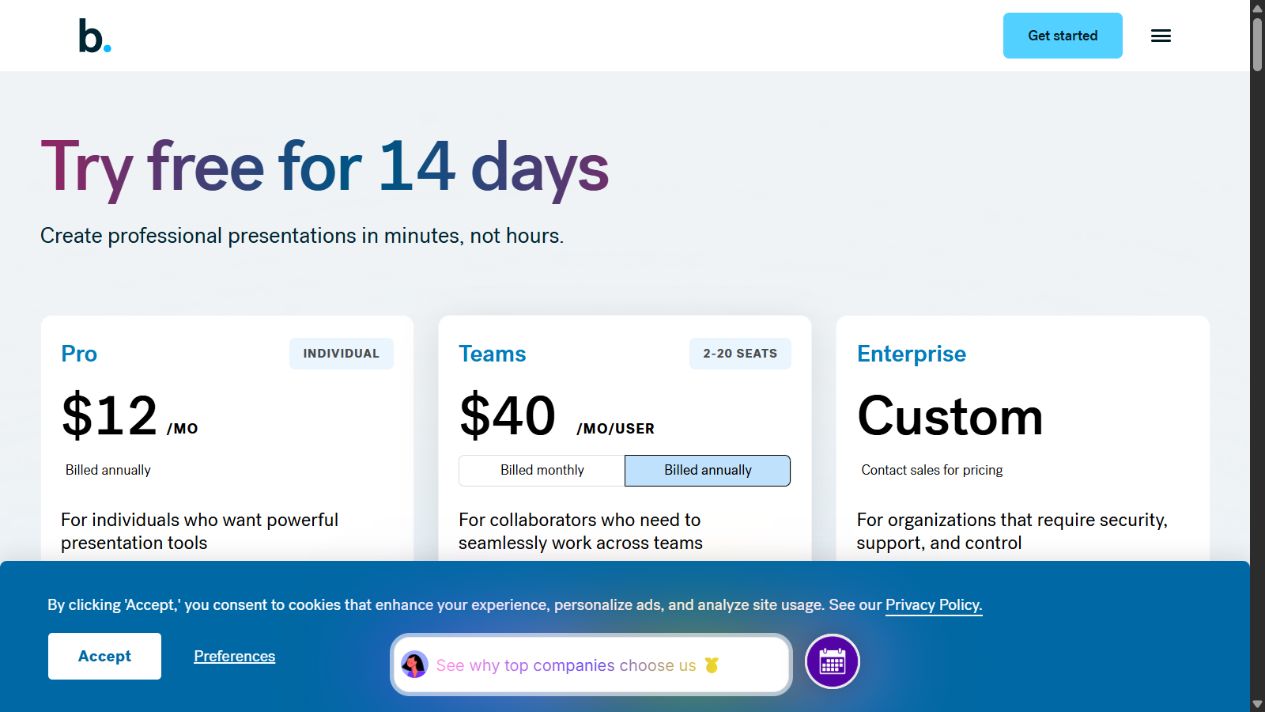
Beautiful.ai’s public US pricing starts with Pro at $12 per month billed annually for one user. Team is listed at $40 per user per month billed annually or $50 per user monthly for 2–20 seats. Enterprise uses custom pricing, and a $45 monthly single-presentation option is listed for ad hoc projects. A 14-day trial is available, requires a credit card, and converts to paid billing unless cancelled.
These prices were checked on August 23, 2026. Verify the official page before purchase because plans, billing terms, taxes, discounts, and packaging can change.
The best plan depends on whether the buyer needs an individual design workflow, a managed team workspace, or enterprise administration. Cost should be compared with presentation volume and time saved, not with slide count alone.
Beautiful.ai pricing at a glance
| Plan | Published price checked | Intended buyer | Key buying consideration |
|---|---|---|---|
| Pro | $12/month billed annually | One individual | Annual commitment and individual workflow |
| Team | $40/user/month annually or $50/user/month monthly | 2–20 collaborators | Seats, shared resources, governance, and adoption |
| Enterprise | Custom quote | Larger or controlled organizations | Security, administration, support, and contract terms |
| Single presentation | $45 monthly | One ad hoc project | Cancellation timing and whether one month is enough |
Pro pricing and fit
Pro is the individual plan. The official page lists unlimited slides, AI content generation, custom branding, file or link context, AI images, writing and translation tools, more than 300 Smart Slide layouts, auto-formatting, media libraries, animations, data visualizations, themes, PowerPoint import and export, viewer analytics, and presentation resources.
The published $12 monthly price is billed annually, so the practical commitment is an annual subscription rather than a cancellable $12 month. Buyers should confirm the total charged, currency, taxes, renewal date, and refund policy at checkout.
Pro makes the most sense when one person creates presentations regularly and the time spent formatting is material. It is less compelling when decks are rare or an existing PowerPoint, Google Slides, Keynote, or Canva process already works.
Team pricing and fit
Team is intended for 2–20 seats. The pricing page lists $40 per user per month on annual billing and $50 per user on monthly billing. At the published annual rate, five seats imply $2,400 per year before taxes or changes. Ten seats imply $4,800 per year.
Those calculations are simple illustrations, not quotes. They assume all seats remain active for a full annual term at the displayed rate.
Team adds a collaborative workspace and controls such as real-time editing, centralized slide and template libraries, version control, locked slides, themes, shared assets, linked chart data, engagement tracking, viewer analytics, alerts, access management, and translation-related capabilities.
The plan is worth evaluating when presentation consistency is an organizational problem. Do not buy Team only because several people may occasionally view a deck. Confirm which roles need paid creation seats and how guest collaboration works under current terms.
Team seat planning
Build a seat list from actual workflows rather than department headcount. Separate frequent creators, occasional editors, reviewers, viewers, and administrators. Ask the vendor which roles require a paid seat and whether a collaborator outside the workspace can review or edit under the selected plan.
Model expected growth before choosing annual billing. A lower annual unit rate can be offset by unused seats when hiring plans change. Confirm how seats can be added, reassigned, or removed during the term and whether additions are prorated.
Enterprise pricing
Enterprise has no public list price. A quote may depend on users, security requirements, support, procurement terms, onboarding, and contract length. The official plan comparison should be used to prepare questions, not to estimate a final quote.
Ask sales to separate:
- subscription and implementation costs;
- minimum seat or contract commitments;
- SSO, provisioning, audit, and permission capabilities;
- support and service terms;
- data processing and security commitments;
- renewal increases and termination conditions;
- training or migration services;
- sandbox, proof-of-concept, or pilot access.
Enterprise is relevant when presentation content is sensitive, brand resources require centralized control, or user lifecycle management cannot be handled manually.
The single-presentation option
The pricing page lists a $45 monthly option for an ad hoc project and describes it as including Pro capabilities. This can be useful when someone needs one polished deliverable without an annual commitment.
Check how cancellation works, when access ends, how files can be exported, and whether future edits will require another paid month. A one-time deck that must remain editable for a year may be less “one time” than it first appears.
Trial terms
Beautiful.ai advertises a 14-day trial for Pro and Team. The official FAQ says a credit card is required and the card will be charged if the subscription is not cancelled before the trial ends.
Treat the trial as a procurement test, not casual browsing. Record the start and conversion dates, identify the owner responsible for cancellation, and use representative decks. Review refund terms before starting because missing the cancellation deadline can create a full charge.
Total cost of ownership
The subscription price is only one component. Include:
- employee setup and training time;
- building themes, templates, and libraries;
- maintaining approved brand assets;
- migrating or recreating existing decks;
- correcting AI-generated claims and images;
- export cleanup in PowerPoint or Google Slides;
- administrative and security review;
- overlapping presentation or AI subscriptions;
- inactive seats and renewal management.
The tool can still create positive value when it reduces routine design work and review cycles. The calculation should use measured time from a pilot rather than vendor case-study percentages.
Export and migration costs
Beautiful.ai’s native experience can include animations, media, themes, and adaptive layouts that external software handles differently. Official documentation warns that animations and transitions can be lost outside the platform, while Google Slides does not retain certain embedded media. A team that delivers editable PowerPoint files should include export review and correction time in the cost model.
Migration is another cost. Existing templates may need to be recreated as themes, and old slide libraries need selection rather than wholesale import. Moving every historical slide can preserve outdated claims and designs. Start with the highest-use materials and assign an owner to approve each reusable asset.
Governance costs
Shared themes and libraries require maintenance. Someone must update logos, fonts, approved claims, screenshots, legal language, and pricing slides. Permissions and locked resources need review when responsibilities change. These activities create real work, but they may replace more expensive decentralized corrections.
AI review costs
AI generation can shorten the first draft while increasing verification work. Include time for checking facts, citations, confidential information, generated images, and brand claims. If reviewers repeatedly rebuild the story or correct unsupported content, the apparent drafting speed is not a net saving.
Cost scenarios
Individual consultant
Pro can be economical when a consultant produces proposals, workshops, or reports every week. The buyer should compare the annual fee with hours spent aligning layouts and rebuilding themes.
Five-person sales or marketing team
At the displayed annual Team rate, five seats equal $200 per month or $2,400 per year before taxes. The purchase should reduce formatting work, outdated slides, brand corrections, or review delays by more than that amount.
Occasional founder deck
The single-presentation option may cost less than annual Pro when the requirement is genuinely temporary. Existing presentation software remains the lower-cost choice when the founder already has a suitable template and design skill.
Larger organization
Enterprise value depends on governance and risk as much as creation speed. SSO, lifecycle management, permissions, support, and contractual protections may justify a higher quote, but each requirement should be confirmed in writing.
Billing and refund considerations
The official pricing FAQ says subscriptions can be cancelled from the billing section. It also describes limited circumstances for partial annual refunds and notes that monthly subscriptions are non-refundable. These policies can change and may depend on timing.
Before checkout, save the current terms, invoice details, renewal date, and cancellation procedure. Do not rely on an old search snippet or third-party pricing table.
How to choose a plan
Choose Pro when one person creates presentations frequently and does not need a managed team workspace.
Choose Team when 2–20 active creators need shared themes, templates, assets, collaboration, brand controls, and analytics.
Request Enterprise when security, SSO, provisioning, auditability, support, procurement, or larger-scale governance is mandatory.
Consider the single-presentation option for a short, isolated project after checking cancellation and future-edit requirements.
Keep the existing stack when presentation volume is low, users need unrestricted design, or exports require extensive correction.
Questions for a sales or procurement call
For Team or Enterprise purchases, request written answers to the requirements that affect cost:
- Which users need paid licences?
- Are seat additions prorated, and can seats be reduced mid-term?
- Which AI capabilities have usage limits or separate terms?
- What support channels and response commitments apply?
- Which security controls are included in each plan?
- Are SSO, provisioning, audit events, and advanced permissions standard or negotiated?
- How does renewal pricing work?
- What happens to presentations and exports after cancellation?
- Can the buyer run a pilot with the intended security configuration?
Avoid negotiating only the unit price. A plan that lacks a required control, export, or support term can cost more through manual work and risk.
Measuring return on investment
Use a baseline deck and record research, drafting, formatting, review, and export time in the current workflow. Repeat the task in Beautiful.ai with equivalent source material and quality expectations. Multiply the validated time difference by realistic annual deck volume and an appropriate internal labour cost.
Then subtract subscription, implementation, training, administration, and correction costs. Keep quality measures beside the financial estimate: number of brand corrections, reviewer changes, export defects, and outdated slides reused. The calculation should support a decision, not manufacture a positive result.
Repeat the measurement after the initial learning period. A short trial may include setup costs that decline, while early enthusiasm can also exaggerate long-term adoption. A renewal decision should use sustained usage rather than trial activity.
A pricing validation checklist
Before buying, confirm:
- displayed currency and tax treatment;
- monthly versus annual billing;
- total amount charged at checkout;
- seat minimums and role requirements;
- trial conversion date;
- cancellation and refund rules;
- included AI usage and plan limits;
- export formats and downstream editing needs;
- security and administrative requirements;
- renewal terms and owner.
Is Beautiful.ai worth the price?
Beautiful.ai can be worth the price when presentations are a frequent deliverable and adaptive layouts, brand consistency, libraries, collaboration, or distribution remove measurable work. Its value is weaker for infrequent creators or organizations already satisfied with another presentation platform.
Run a representative pilot. Compare total creation and review time with the existing process, test the hardest slide and export route, and calculate the annual cost using the seats that will actually be active.
Frequently asked questions
How much does Beautiful.ai cost?
The official US page listed Pro at $12 per month billed annually, Team at $40 per user per month annually or $50 monthly, custom Enterprise pricing, and a $45 single-presentation monthly option when checked on August 23, 2026.
Does Beautiful.ai have a free plan?
The official pricing page advertised a 14-day trial, not a permanent free plan. The trial requires a credit card and converts to paid billing unless cancelled.
What is the difference between Pro and Team?
Pro serves one individual. Team adds collaboration, shared resources, governance, brand controls, analytics, and other workspace capabilities for 2–20 seats.
Can I pay for one presentation?
The page listed a $45 monthly single-presentation option. Verify cancellation, export, and future editing requirements before buying.
Is Beautiful.ai worth the price?
It can be when frequent deck production and brand consistency create measurable costs. Occasional users should compare it with tools they already own.
Official sources: Beautiful.ai pricing , Pro plan , export documentation , collaboration guide , and billing support .
Frequently asked questions
How much does Beautiful.ai cost?
The official US page listed Pro at $12 per month billed annually, Team at $40 per user per month billed annually or $50 monthly, custom Enterprise pricing, and a $45 single-presentation monthly option when checked on August 23, 2026.
Does Beautiful.ai have a free plan?
The pricing page advertised a 14-day Pro or Team trial rather than a permanent free plan. A credit card is required and billing starts unless the trial is cancelled.
What is the difference between Pro and Team?
Pro is intended for one individual. Team adds a collaborative workspace, shared libraries, brand controls, live editing, governance, and engagement features for 2–20 seats.
Can I pay for one Beautiful.ai presentation?
The official pricing page listed a $45 monthly single-presentation option for ad hoc work. Buyers should verify cancellation and current terms before purchase.
Is Beautiful.ai worth the price?
It can be when frequent presentation work, brand consistency, shared assets, and formatting time create measurable costs. Occasional users may be better served by existing presentation software.