Beautiful.ai vs ChatGPT: Which Is Better?
Compare Beautiful.ai and ChatGPT for presentations, slide design, research, writing, collaboration, pricing, and business use.
Direct answer
Beautiful.ai is better when the outcome must be a polished, consistently designed presentation. ChatGPT is better when the work begins with research, reasoning, analysis, outlining, and writing across many document types.
Beautiful.ai is a presentation platform with AI-assisted creation, adaptive Smart Slides, themes, collaboration, sharing, analytics, and export. ChatGPT is a general AI workspace that can help develop the argument and content behind a deck but is not primarily a presentation-management system.
This comparison uses official sources checked on August 7, 2026. We did not test design quality, export fidelity, generation speed, or model output hands-on. Recommendations are editorial conclusions based on documented capabilities and buyer fit.
Beautiful.ai vs ChatGPT at a glance
| Decision area | Beautiful.ai | ChatGPT |
|---|---|---|
| Best for | Creating, formatting, sharing, and governing presentations | Researching, analyzing, outlining, and drafting content |
| Core strength | Smart Slides and presentation workflow | General-purpose reasoning and knowledge work |
| Design controls | Themes, brand styling, layout guardrails, libraries | Can generate ideas and images, but is not a full slide-design system |
| Collaboration | Team workspace, shared assets, templates, live editing | Shared workspace and project capabilities vary by plan |
| Distribution | Secure links, viewer analytics, offline playback, PDF and PowerPoint export by plan | Content must usually move into another presentation tool |
| Main limitation | Narrower use case | More manual presentation assembly and visual QA |
The key question: are you buying an answer engine or a presentation system?
ChatGPT can help a team decide what a presentation should say. It can analyze source material, structure an argument, create an executive summary, suggest slide titles, and challenge weak logic. Those are important jobs, but they happen upstream of the final deck.
Beautiful.ai is designed for the production layer. Its official materials describe Smart Slides that adapt as content changes, more than 300 layouts, custom branding, AI-assisted presentation creation, collaborative workspaces, sharing controls, viewer analytics, and export options.
If presentations are a recurring deliverable, the production layer can become the bottleneck. If presentations are occasional, a dedicated platform may be unnecessary.
Where Beautiful.ai is stronger
Adaptive slide design
Beautiful.ai’s Smart Slides are intended to adjust layout as content is added or changed. The official pricing page lists auto-formatting, dynamic data visualizations, media libraries, animations, and more than 300 Smart Slide layouts.
That can reduce manual alignment and formatting work. It can also constrain creative freedom. Beautiful.ai distinguishes Smart Slides from Classic Slides, which provide more open-ended control. Buyers should test whether the guardrails accelerate their real deck or make exceptions harder.
A complete presentation workflow
Beautiful.ai covers more than generation. Official product pages describe presenter view, secure sharing, embedded decks, narration, viewer analytics, offline playback, and exports. This creates a continuous path from draft to delivery.
ChatGPT can prepare content, but a team still needs another application to arrange, govern, present, and distribute the deck. The handoff is the practical difference.
Team brand governance
Beautiful.ai Team adds a workspace for collaboration and control, shared slide and template libraries, workspace themes, asset libraries, and brand guardrails. Enterprise adds controls such as SAML SSO, audit events, user provisioning, and advanced permissions according to its plan comparison.
For agencies, sales teams, and marketing organizations, reusable assets can be more valuable than generation itself. The team should still define who owns templates and who approves changes.
Where ChatGPT is stronger
Research and synthesis
ChatGPT is more useful when the source material is messy: transcripts, reports, spreadsheets, notes, PDFs, or competing arguments. It can help identify themes, summarize evidence, and structure a narrative before slide design begins.
That is especially useful for strategy decks, board updates, proposals, and research presentations. The limitation is factual reliability. Every material claim, quote, and number still requires verification against the source.
Iterative thinking
A presentation often improves through questions: What does the audience already know? Which objection appears first? What evidence supports the recommendation? Which detail belongs in an appendix? ChatGPT’s conversational structure is well suited to this reasoning process.
Beautiful.ai can generate an outline and slides, but its primary value is producing the presentation. ChatGPT is the stronger thinking partner when the narrative is not yet settled.
Broader return on one subscription
A general AI workspace can support emails, analysis, documents, coding, planning, research, and presentation preparation. For a small business, that breadth may produce more value than a presentation-only subscription.
The trade-off is that broad tools rarely provide the deepest workflow for every output. A team producing client decks every week may save more time with a dedicated presentation platform.
Pricing and plan considerations
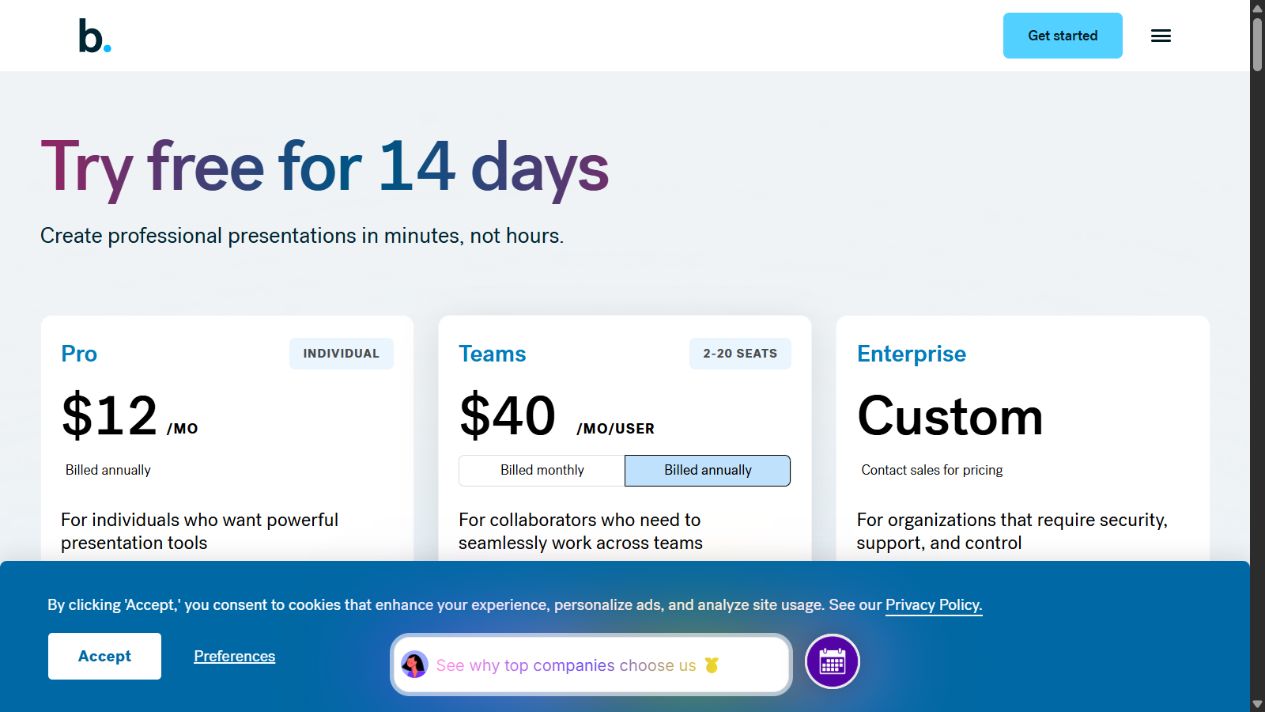
Beautiful.ai’s official pricing page showed these public US options when checked:
- Pro: $12 per month billed annually for one person.
- Team: $40 per user per month billed annually or $50 per user monthly, for 2-20 seats.
- Enterprise: custom pricing for larger organizations and advanced controls.
- Single presentation: a $45 one-off option was listed for an ad hoc project.
The page also describes a 14-day trial requiring a credit card. Buyers should review cancellation and refund terms before starting.
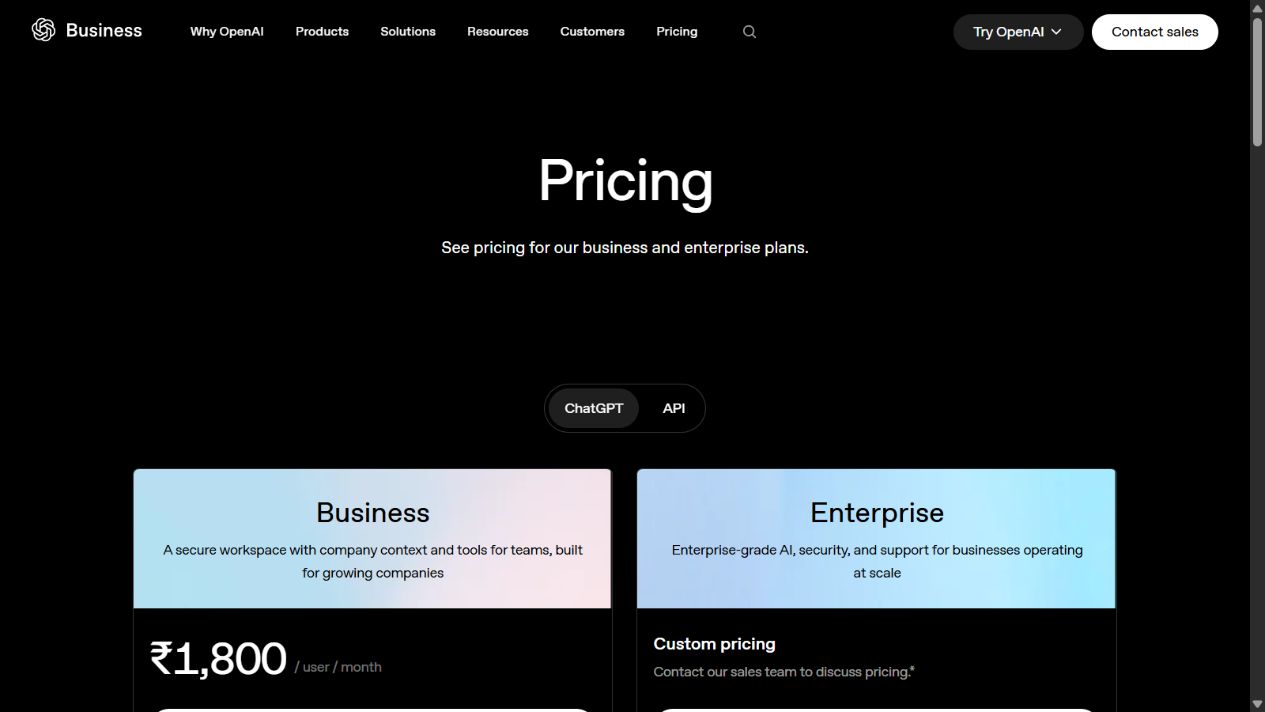
ChatGPT pricing and Business seat rules changed during 2026, so verify the current OpenAI pricing page at purchase. The useful cost comparison is not simply monthly subscription versus monthly subscription. Include:
- number of presentation creators;
- frequency of decks;
- time spent formatting and revising;
- need for shared libraries and brand controls;
- value of ChatGPT across non-presentation work;
- export and delivery requirements.
Buyer fit by scenario
Sales team creating repeatable decks
Beautiful.ai is the stronger fit when representatives need approved slides, consistent branding, and a faster way to adapt proposals. Test whether shared libraries prevent old slides from resurfacing.
ChatGPT is more useful for researching an account, outlining a narrative, and drafting speaker notes. It does not replace the controlled slide library.
Founder preparing an occasional investor update
ChatGPT may be enough for organizing the story and tightening the writing if the founder already uses PowerPoint, Google Slides, or Keynote comfortably. A Beautiful.ai subscription becomes easier to justify when formatting repeatedly consumes time.
Marketing or agency team
Beautiful.ai is better suited to high-volume presentation production, brand consistency, and client-ready outputs. ChatGPT can still support research, campaign thinking, and narrative development.
Analyst or consultant
The decision depends on the bottleneck. Choose ChatGPT if analysis and argument development take most of the time. Choose Beautiful.ai if the logic is already clear but deck assembly and visual consistency delay delivery.
Neither tool may be enough when
- the organization requires advanced financial charting or specialized data visualization;
- designers need unrestricted visual control;
- the deck must use a complex corporate PowerPoint template with exact export fidelity;
- sensitive information requires controls not available on the selected plan;
- the team has no review process for AI-generated facts or images.
In these cases, retain the existing presentation stack and test AI in a limited upstream role.
A practical two-workflow pilot
Test both products against the same project without pretending they do the same job:
- Gather the approved source material.
- Use ChatGPT to extract claims, objections, and a proposed narrative.
- Verify every material fact against the source.
- Build the deck in Beautiful.ai using the approved outline.
- Record time spent on research, writing, formatting, corrections, and export.
- Ask two reviewers to score clarity, brand fit, and decision usefulness.
Then run a second version using only the company’s existing tools. The result shows whether either subscription improves the complete workflow rather than only producing an impressive first draft.
Common buying mistakes
Choosing based on generated first slides
A polished first output can hide revision difficulty. Test the hardest slide, not only the title slide.
Ignoring export requirements
Beautiful.ai documents editable PowerPoint and Google Slides export as paid-plan capabilities. Test the exact export and downstream editing process your team needs.
Confusing visual polish with a strong argument
Good design cannot repair weak evidence. Settle the reader’s decision, narrative, and proof before optimizing appearance.
Buying a team plan without governance ownership
Shared libraries become useful only when someone maintains themes, approved assets, and templates.
Related guides
Our AI tools evaluation guide explains how to design a controlled pilot. For a broader shortlist, see best AI tools for small businesses and how to choose AI tools . Creative teams comparing specialist platforms can also use Adobe Firefly vs ChatGPT and the AI governance checklist for business teams .
Official sources checked
- Beautiful.ai pricing and plan comparison
- Beautiful.ai for individuals
- Beautiful.ai: Creating a presentation with AI
- Beautiful.ai: Slide AI
- Beautiful.ai export documentation
- OpenAI: What is ChatGPT Business?
- OpenAI business privacy and security
Verdict
Choose Beautiful.ai when polished presentations are a frequent business output and adaptive layouts, brand libraries, sharing, analytics, or export form the real workflow. Choose ChatGPT when the harder job is research, analysis, narrative development, and broad knowledge work.
The strongest process may use both, but only when each solves a distinct bottleneck. Do not pay for two AI products merely because both can produce slide text.
Frequently asked questions
Is Beautiful.ai better than ChatGPT for presentations?
Beautiful.ai is better for producing and managing finished presentations because it provides adaptive Smart Slides, presentation themes, collaboration, sharing, analytics, and export tools. ChatGPT is stronger for research, reasoning, outlining, and drafting presentation content.
Can ChatGPT replace Beautiful.ai?
ChatGPT can help plan and draft a deck, but it does not replace Beautiful.ai's complete presentation workspace, Smart Slide layout system, presentation player, workspace libraries, and distribution features.
Which is better for a small team?
Choose Beautiful.ai when polished presentations are a frequent deliverable. Choose ChatGPT when presentations are occasional and the team needs a broader assistant for research, writing, files, and analysis.
Does Beautiful.ai offer a free trial?
Beautiful.ai's official pricing page listed a 14-day trial for Pro and Team plans when checked on August 7, 2026. It states that a credit card is required and billing begins if the trial is not cancelled.