Bolt.new Review (2026)
An evidence-based Bolt.new review covering AI app generation, browser development, hosting, Bolt Cloud, imports, pricing, limitations, and production fit.
Direct answer
Bolt.new is a focused AI application builder for turning natural-language instructions into web applications, websites, and prototypes inside a browser workspace. Its strongest value is reducing setup between prompting, code generation, preview, iteration, and deployment. Its main risk is that a fast working screen can hide security, data, dependency, accessibility, and maintainability problems that still require professional review.
Bolt is most suitable for prototypes, internal tools, landing pages, and contained applications where the team understands the production boundary. It should not be treated as an automatic approval system for applications handling payments, sensitive data, critical operations, or complex authentication.
This review uses official Bolt sources checked on August 24, 2026. We did not build or deploy an application hands-on.
Bolt.new review summary
| Area | Assessment |
|---|---|
| Best for | Rapid web prototypes and contained app projects |
| Core strength | Integrated prompt, code, preview, and deployment workflow |
| Development model | Browser-based AI generation with editable code and visual iteration |
| Infrastructure | Bolt Cloud capabilities include hosting and backend services |
| Main limitation | Generated output still requires engineering and security ownership |
| Cost driver | Plan, token usage, hosting, domains, services, and hardening effort |
| Research basis | Official product, pricing, use-case, support, and release material |
What Bolt.new does
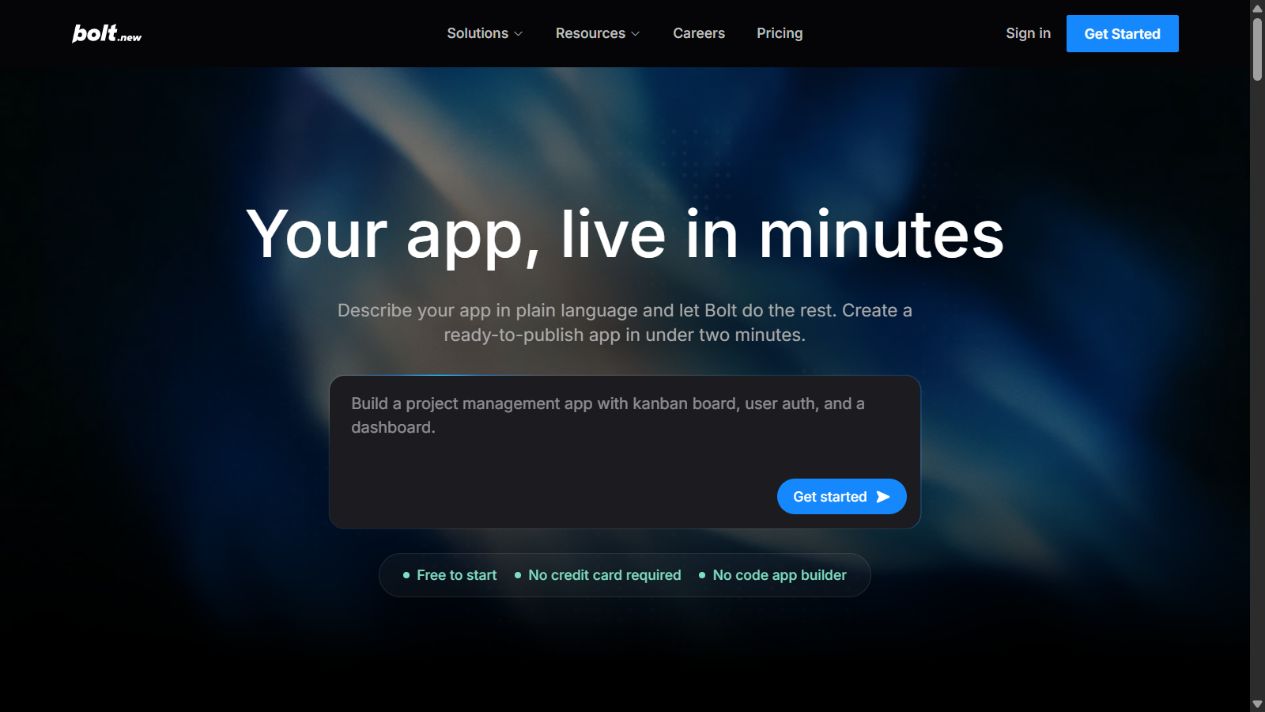
Bolt combines an AI coding agent with an in-browser project environment. A user describes a website or application, observes generated code, previews the result, iterates through conversation or code edits, and can deploy through the surrounding platform.
Official pages describe imports from sources such as GitHub and Figma, design-system support, integrated infrastructure through Bolt Cloud, hosting, databases, integrations, and deployment. Product capabilities and availability can vary by plan and change over time.
This integrated workflow distinguishes Bolt from a general assistant that returns code snippets. The project exists in a development environment where the user can inspect and modify it.
Where Bolt.new is strongest
Fast path from idea to working interface
Bolt reduces the setup normally required before a developer can see an application running. A user can describe pages, workflows, data, and visual direction in natural language, then inspect the generated result.
That speed is useful for validating a concept, demonstrating a workflow, or clarifying requirements. A working prototype can reveal missing states and user-flow problems that remain abstract in a written specification.
The first screen is not the final product. Measure how well the code handles subsequent requirements, errors, data changes, and maintenance.
Integrated code and preview
Because generated work runs in the browser workspace, users can connect instructions to visible changes. This can make iteration more accessible to product managers, designers, founders, and developers collaborating on a prototype.
The code remains an important artifact. A qualified developer should understand the structure, dependencies, configuration, and failure behavior before production use.
Deployment and Bolt Cloud
Official Bolt material describes deployment and Bolt Cloud infrastructure, including hosting and backend-related capabilities. This can reduce the number of services required for a contained project.
An integrated deployment path is convenient, but it concentrates operational decisions. Teams must still define ownership for domains, environments, secrets, backups, logs, access, incident response, and rollback.
Verify current quotas and boundaries for databases, storage, bandwidth, hosting, and custom domains. Do not infer unlimited production capacity from the presence of a deploy button.
Starting from existing assets
Bolt’s current official pages reference importing from GitHub and Figma and using organizational design systems. This can help a team begin with existing code or visual standards rather than a blank prompt.
Imports should be tested carefully. A design file does not specify every interaction, validation rule, data model, or accessibility requirement. A repository may contain secrets, unsupported dependencies, or architecture assumptions that should not be exposed without review.
Useful for cross-functional prototyping
Bolt can give non-developers a more concrete way to express application requirements. Instead of handing engineering a vague description, a product team can present a prototype with visible states and documented assumptions.
The prototype should support communication, not bypass engineering judgment. Label simulated data and incomplete functionality clearly so stakeholders do not mistake a demonstration for a production-ready service.
Important limitations
Generated code is not automatically secure
An application can look correct while mishandling authentication, authorization, secrets, data validation, database permissions, rate limits, or error messages.
Before production, review threat boundaries, access rules, dependency risk, secret storage, logging, abuse controls, and data lifecycle. High-risk applications require security expertise and testing appropriate to their impact.
Maintainability appears after the first iteration
The initial generation may be fast. The harder question is whether another developer can understand and change the project months later.
Inspect architecture, naming, component boundaries, test coverage, dependency choices, and documentation. Ask Bolt to explain generated decisions, then verify the explanation against the code.
If every change creates unrelated regressions or duplicate components, the early speed creates later debt.
Token and usage models complicate cost
Bolt plans use token allowances and other resource limits. The cost of a project depends on generation and iteration volume, not only the displayed subscription.
Hosting, custom domains, databases, storage, bandwidth, external APIs, and engineering review can add cost. Estimate the full lifecycle rather than comparing only monthly plan prices.
Output quality depends on the specification
Natural-language prompting does not remove the need for requirements. Vague instructions produce ambiguous behavior. Complex applications require explicit data models, roles, validations, edge cases, and acceptance tests.
Break work into verifiable increments. Approve one workflow before generating the next. Keep a list of requirements outside the chat so important constraints do not disappear during iteration.
Accessibility needs deliberate testing
A responsive page is not necessarily accessible. Test keyboard navigation, focus order, labels, error messages, contrast, motion, headings, landmarks, alternative text, and screen-reader behavior.
Include accessibility requirements in the specification and test the generated result. Do not rely on visual inspection alone.
Bolt.new pricing and value
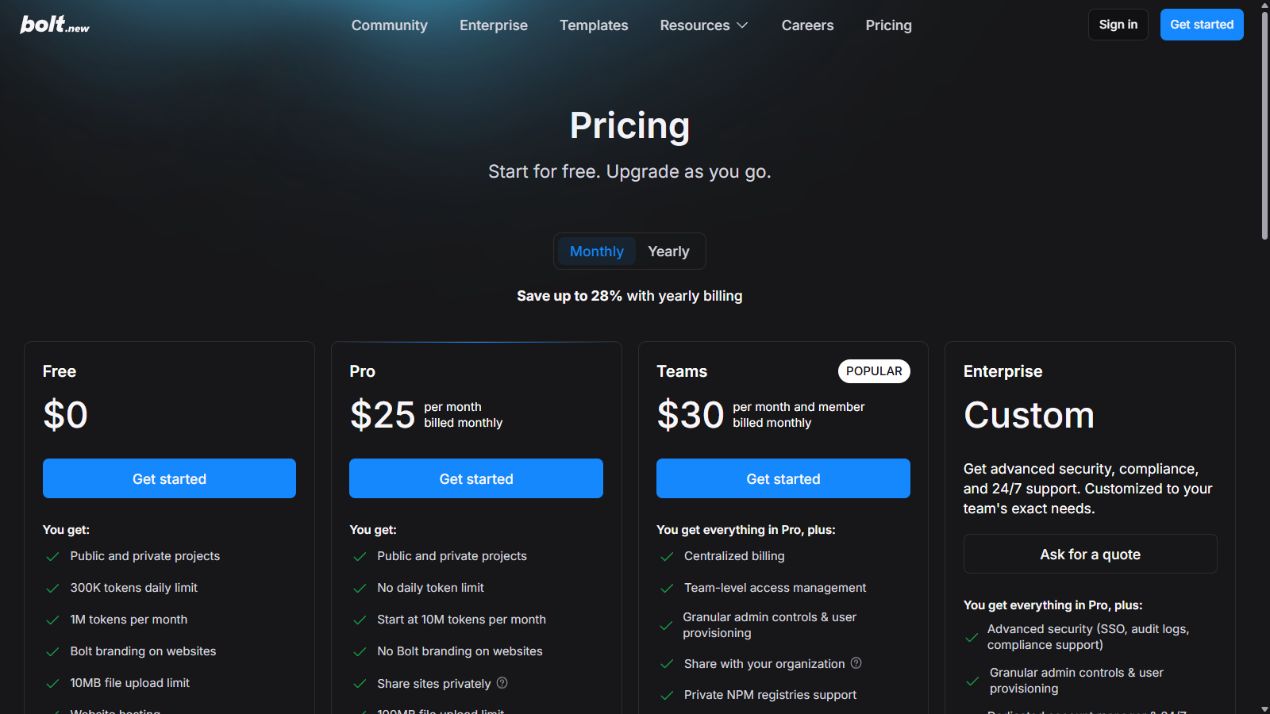
Bolt’s official pricing page listed Free, Pro, Teams, and Enterprise packaging when checked. Plans differ by token allowances, hosting or project capabilities, team controls, domains, and related limits.
The product can be valuable when it shortens a real prototype cycle or reduces environment setup. It is poor value when teams spend more time correcting generated code than implementing a well-understood solution directly.
Calculate subscription, tokens, hosting, third-party services, review, testing, remediation, and ongoing maintenance. A prototype that becomes production needs a different budget from a disposable demonstration.
Who should use Bolt.new
Bolt is a stronger fit for:
- Founders validating a contained web-product idea.
- Product teams making interactive prototypes.
- Designers translating a workflow into a working interface.
- Developers accelerating a small, well-scoped application.
- Marketing teams creating landing pages with engineering review.
- Internal teams building low-risk tools under defined controls.
It is a weaker fit as the sole control for:
- Payment or financial systems.
- Applications processing sensitive or regulated data.
- Complex multi-tenant authorization.
- Safety-critical or operationally critical services.
- Systems requiring strict auditability and uptime commitments.
- Projects without anyone qualified to review and maintain code.
A responsible Bolt workflow
- Define the user, job, data, and risk level.
- Write acceptance criteria and prohibited behaviors.
- Create a small prototype with synthetic data.
- Inspect generated code and dependencies.
- Add authentication and authorization only with deliberate review.
- Test validation, errors, accessibility, and abuse cases.
- Separate development, test, and production environments.
- Configure secrets outside source code.
- Add monitoring, backups, and rollback.
- Obtain required engineering, security, legal, and business approval.
How to evaluate Bolt.new in a pilot
Use a realistic but low-risk application with several states: authentication, a form, validation, stored data, search, permissions, and export. Use synthetic records.
Measure time to first working version and time to an approved maintainable version. Record defects, security assumptions, accessibility issues, token use, deployment steps, and how easily a second person understands the code.
Compare Bolt with the current development workflow. The useful metric is total effort to a safe, maintainable result, not minutes to a demo.
Data, privacy, and ownership questions
Before connecting a repository, design file, database, or third-party service, determine what information Bolt and its subprocessors can receive. Review the current terms, privacy documentation, plan-specific controls, and organizational policy. Public marketing language is not a substitute for a written answer to a material security requirement.
Confirm who owns generated code and assets, which open-source licenses apply to dependencies, and whether generated media or copy needs additional review. Keep credentials, API keys, customer records, and production data out of prompts and source files unless the approved environment and controls explicitly support them.
Use synthetic data during early prototypes. When real data becomes necessary, minimize fields, restrict access, document retention, and test deletion. A prototype should not quietly become an unmanaged production database.
Operational readiness checklist
Deployment is the start of operational responsibility, not the end of building. Before a public release, verify:
- A named owner can access the account, domain, repository, and infrastructure.
- Production secrets are stored securely and can be rotated.
- Database backups and restoration have been tested.
- Logs provide enough context without exposing sensitive data.
- Monitoring detects failed requests, availability problems, and unusual use.
- Error messages do not leak implementation or customer information.
- Dependency updates and vulnerability findings have an owner.
- A previous stable release can be restored.
- Usage, hosting, and third-party spending have alerts.
- The organization knows how to disable the service during an incident.
For an internal prototype, some controls can be proportional to low impact. For a customer-facing or revenue-critical application, they are release requirements.
Evidence that Bolt is delivering value
Track more than the number of generated projects. Measure how many prototypes reach an approved decision, how much engineering effort is needed after generation, and whether teams reuse maintainable components instead of creating abandoned experiments.
Useful indicators include cycle time to validated prototype, defect rate, accessibility findings, security remediation effort, token consumption, deployment failures, and time required for a second developer to make a change. Compare these metrics with conventionally built projects of similar scope.
If the team produces more demos but not more validated decisions or maintainable releases, the tool may be increasing activity rather than value. Narrow the use case, improve specifications, or add stronger technical review before expanding adoption.
Bolt.new versus ChatGPT
Bolt is more direct for generating, previewing, and deploying an application in one environment. ChatGPT is broader across research, planning, code explanation, review, writing, and business work.
The tools can complement one another, but the team must define which repository, deployment system, and review process are authoritative. Read our Bolt.new vs ChatGPT comparison for a complete decision framework.
Final verdict
Bolt.new is a strong rapid application-building environment when the project is scoped, the data is controlled, and qualified people own production review. It is not a substitute for software engineering accountability.
Use it to compress the path from idea to inspectable prototype. Promote the result only after code, security, data, accessibility, deployment, and maintenance gates pass.
FAQs
Is Bolt.new a no-code tool?
Its prompt workflow can be used without writing code, but the output is a software project. Production use still benefits from coding, architecture, security, and operations expertise.
Can Bolt.new build a full application?
Official material describes full application generation, preview, infrastructure, and deployment capabilities. Whether a specific application is production-ready depends on its requirements and review.
Can I import a GitHub repository?
Current official pages reference GitHub import. Review repository access, secrets, licenses, dependencies, and compatibility before connecting production code.
Is Bolt.new suitable for business data?
Suitability depends on the exact plan, configuration, data classification, security requirements, and application design. Obtain written verification for material requirements.
What is the biggest Bolt.new risk?
The biggest risk is treating a working visual prototype as a secure, maintainable production application without sufficient review and testing.
Official sources
Sources checked August 24, 2026. Plans, limits, and capabilities can change.
Frequently asked questions
What is Bolt.new used for?
Bolt.new is used to generate, edit, preview, and deploy web applications and websites from a browser-based AI development workspace.
Can a non-developer use Bolt.new?
A non-developer can use the prompt-driven workflow for prototypes, but production applications still require qualified review of security, data, authentication, dependencies, accessibility, and operations.
Does Bolt.new include hosting?
Official product and pricing material describes Bolt Cloud, hosting, deployment, and custom-domain capabilities under applicable plans. Verify current limits before purchase.
Is Bolt.new free?
Bolt lists a free starting option with plan and usage limits. Pricing, token allowances, hosting quotas, and included capabilities should be checked on the official pricing page.
Did The SaaS Education test Bolt.new?
No. This review is based on official sources checked on August 24, 2026 and does not claim hands-on testing.