Canva Magic Studio Pricing: Plans, Costs, and Value
Understand Canva Magic Studio pricing across Free, Pro, Business, and Enterprise, including AI allowances, add-ons, team costs, and buyer fit.
Direct answer
Canva Magic Studio does not have one separate universal price. Its AI creation and editing capabilities are distributed across Canva Free, Pro, Business, and Enterprise, with plan-dependent features and a shared monthly AI allowance. On Canva’s US pricing page checked August 31, 2026, Free was US$0 for one person, Pro was US$144 per year for one person, Business was US$250 per year per person, and Enterprise required a sales conversation. Taxes were excluded.
The important cost is not the headline subscription alone. Buyers also need to model active seats, legacy Teams arrangements, premium content, Brand Kits, approvals, storage, AI allowance, AI tier consumption, optional AI Pass, print, integrations, support, onboarding, and review effort. Canva states that higher-tier AI tools and more complex tasks can consume the shared allowance differently, so a simple “number of prompts” estimate can be misleading.
This article uses official public sources rather than a paid workspace. Prices, currencies, billing periods, plan names, allowances, and features can change. Check the current pricing page while signed into the purchasing region before approving a budget.
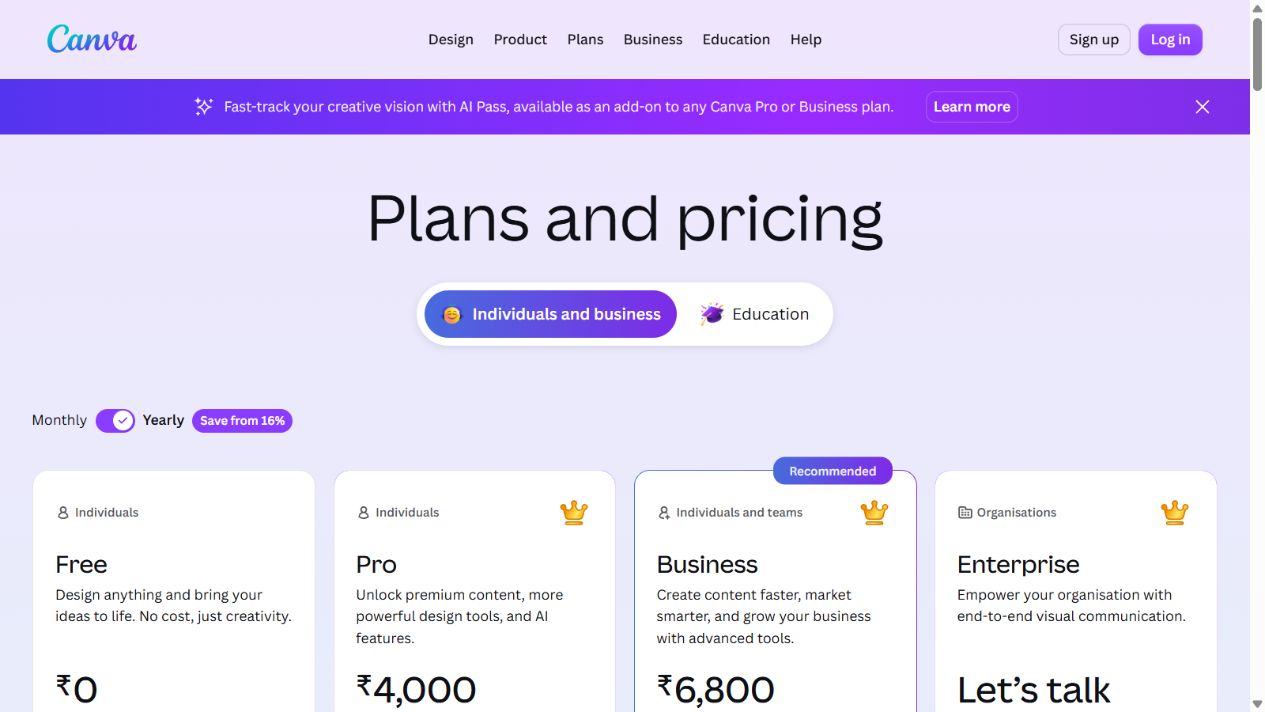
Canva pricing page captured August 31, 2026. The screenshot documents the pricing structure at verification time, not a permanent quote.
Canva Magic Studio pricing at a glance
| Plan | Public US position checked | Best fit | Main cost question |
|---|---|---|---|
| Free | US$0 per year for one person | Occasional individual design and AI experimentation | Will the included content, storage, tools, and AI allowance support real work? |
| Pro | US$144 per year for one person | Individual creator needing premium assets, tools, brand resources, storage, and more AI | Does one creator need the complete premium workflow? |
| Business | US$250 per year per person | Marketers and teams needing collaboration, approvals, more brands, storage, and higher AI use | How many people need paid creation and administrative capability? |
| Enterprise | Contact sales | Large or multi-team organizations needing security, provisioning, governance, integrations, and support | What is included in the negotiated seat, service, storage, and AI configuration? |
The table is a buying map, not a substitute for the current comparison grid. Canva also maintains programs for eligible education and nonprofit users, and legacy Canva Teams customers may have different commercial arrangements.
What buyers are actually paying for
Magic Studio is part of a wider visual communication system. The subscription can include a design editor, templates, stock media, export formats, storage, Brand Kits, scheduling, collaboration, approvals, administration, security, integrations, and AI-assisted tools. The economic value comes from the complete path from idea to approved asset, not merely from generation.
Canva’s current pricing page describes a shared AI allowance across Standard, Premium, and, on eligible paid plans, Ultra AI tools. The number of possible uses depends on the tool tier, task complexity, and mix of tools. Free excludes Ultra use. Paid plans provide larger allowances, and eligible plans can offer an extra-cost AI Pass. This means two teams with the same seat count can consume very different AI capacity.
Canva Free: best for evaluation and occasional individual work
Canva Free provides the editor, many design types, templates, media, limited brand resources, storage, and an AI allowance. The public page checked for this article estimated up to 200 Standard AI uses or 20 Premium AI uses when using one category rather than a mixed workload. Actual total use can be lower when tasks are complex or several tiers are combined.
Free is useful for learning the workflow and producing occasional assets. It is not a reliable proxy for a paid team environment. Premium templates and media, background removal, translation, resize, larger storage, extensive Brand Kits, approvals, administration, and higher AI capacity can change the production experience.
Choose Free when
- One person is evaluating Canva and Magic Studio.
- Asset volume is low and premium content is not required.
- Brand governance and formal approval are unnecessary.
- The team can tolerate limited AI capacity and feature availability.
- The output is reviewed manually before use.
Free-plan risks
Do not build a production process around a tool that is only temporarily available or too limited for expected monthly volume. Record which premium assets or features appear in designs. A free user can open a design containing paid content and then encounter an export or licensing decision later.
Canva Pro: best for a single serious creator
Canva Pro is positioned for one person. The current public page adds premium templates and media, premium tools such as resize, translation, and background removal, more Brand Kits, social scheduling, larger storage, and a larger AI allowance. The page estimated ten times more AI than Free, with Standard, Premium, or Ultra usage ranges and an optional AI Pass.
Pro makes sense when one person produces visual assets frequently and can benefit from premium media and time-saving tools. It is not a team plan simply because designs can be shared. If several people create, approve, administer, or govern work, compare the Business and Enterprise operating model rather than multiplying personal subscriptions without control.
Choose Pro when
- One primary creator needs premium content and editing tools.
- A small set of Brand Kits is enough.
- Social scheduling and increased storage matter.
- AI-assisted design is frequent but does not require team administration.
- The creator remains accountable for quality, rights, and accessibility.
Pro-plan risks
The headline annual price can look low relative to specialist tools, but value depends on use. If the creator primarily needs advanced photo, illustration, layout, video, or motion control, a specialist application may still be necessary. Paying for Canva does not remove specialist software or professional review from complex projects.
Canva Business: best for growing marketing and content teams
Canva Business is positioned between Pro and Enterprise. Canva’s public material describes collaboration and team administration, larger numbers of Brand Kits, approvals, more storage, advanced marketing and growth capabilities, access to additional creative products, and a higher AI allowance. The US page checked for this guide listed US$250 per year per person and described twenty times more AI than Free.
Business is the first plan in this structure that should be evaluated as a team operating system rather than a personal creator account. The buyer must decide who creates, who reviews, who manages brands, who administers users, and who only consumes exports. Paying every stakeholder for a full creation seat can waste budget; giving too few people access can force unsafe account sharing or approval outside the platform.
Choose Business when
- Several people create and collaborate on assets.
- Brand Kits and approval workflows are operational requirements.
- Marketing teams need higher AI capacity and integrated growth tools.
- Team administration and storage exceed an individual workflow.
- Enterprise identity, provisioning, or multi-team controls are not yet required.
Business-plan risks
Per-person pricing scales directly. Model creators, administrators, contractors, seasonal users, and reviewers separately. Confirm how seats are added, removed, reassigned, and billed. Existing Canva Teams customers may retain different terms, so do not assume the new Business page describes a legacy renewal.
Canva Enterprise: best for governed multi-team deployment
Canva Enterprise is sales-led. The pricing page highlights enterprise security and controls, SSO and SCIM provisioning, custom apps, extensive Brand Kits, tiered approvals, multi-team management, larger storage, priority support, and dedicated success support under applicable conditions. Public pricing is not presented as a universal amount.
Enterprise value comes from governance and scale, not merely more AI uses. Large organizations need identity lifecycle, team segmentation, template and brand ownership, approvals, integrations, asset controls, audit, support, and rollout management. A sales quote should map these requirements to written entitlements and service commitments.
Choose Enterprise when
- SSO, SCIM, centralized administration, and enterprise security are required.
- Multiple teams, brands, regions, or business units need separation and governance.
- Custom applications or integrations are part of the operating model.
- Priority support, onboarding, training, or success services matter.
- Procurement needs contractual terms for data, service, support, and exit.
Enterprise-plan risks
Do not compare a quoted Enterprise seat only with Pro. Include implementation, identity integration, template migration, brand governance, training, support, content ownership, and internal administration. Define contracted seats and growth tiers. Request current documentation for security, privacy, subprocessors, retention, deletion, and AI data handling.
Understanding Canva’s AI allowance
The AI allowance is shared across tools rather than a simple unlimited entitlement. Canva groups uses into tiers and notes that higher-tier tools consume more allowance. Complexity and mixed tool usage can reduce the practical number of outputs. The monthly reset makes workload timing relevant: a launch month may require far more capacity than an average month.
Build a workload inventory:
- List the Magic Studio and Canva AI tools used in each asset type.
- Record Standard, Premium, or Ultra classification where Canva publishes it.
- Count expected drafts, edits, reruns, language versions, sizes, and rejected generations.
- Add seasonal and campaign peaks.
- Separate experimentation from approved production.
- Test whether the included allowance covers the expected mix.
- Price an AI Pass or workflow redesign only after measuring the shortfall.
AI use is not equivalent to approved output. One social graphic may consume several generations, edits, expansions, rewrites, and resizes. Measure final accepted assets per allowance consumed.
Hidden and indirect costs
Review and correction
Generated designs still require factual, brand, legal, accessibility, and quality review. Count reviewer time and major correction rounds. Faster first drafts are not a saving when review debt increases.
Premium content and rights
Confirm the licence and export implications of premium stock, fonts, music, video, templates, AI apps, and generated content. Record the source and approval for important external assets.
Additional creative software
Canva may not replace specialist photo, illustration, layout, motion, audio, or video tools. Include the remaining software and handoff cost instead of assuming platform consolidation.
Storage and asset lifecycle
Storage limits differ by plan, but capacity alone does not create asset governance. Define naming, folders, ownership, archival, retention, export, deletion, and offboarding.
Seats and administration
Include administrators, creators, contractors, agencies, seasonal users, and business units. Account sharing is not a savings strategy. Model user turnover and provisioning work.
Print and publishing
Print orders, third-party publishing, advertising, domains, external storage, and distribution can add costs outside the subscription.
Value calculation
Use a simple monthly model:
Monthly value = avoided external production + avoided premium-asset purchases + time saved on approved work - subscription - add-ons - review - administration - rework - remaining specialist tools
Measure a baseline before adoption. For each asset type, record request-to-approval time, review rounds, external spend, defects, reuse, and distribution. Run the same measurement during a pilot. Do not monetize every generated draft as productivity.
Canva is most valuable when templates, Brand Kits, premium media, collaboration, and Magic Studio reduce the complete time to a compliant approved asset. It is less valuable when visual work is rare, outputs need specialist reconstruction, or governance occurs entirely outside the platform.
A practical plan-selection process
Step 1: inventory users
Separate creators, reviewers, administrators, contractors, agencies, and consumers. Determine which roles require a paid seat and which can work through approved exports or review mechanisms.
Step 2: inventory assets
Count presentations, social posts, campaigns, documents, video, images, ads, print, websites, and translated variants. Note premium content, brand, approval, and export requirements.
Step 3: measure AI demand
Test representative Magic Studio tasks for one month. Record tool tier, uses, reruns, failures, accepted outputs, and peaks. Do not extrapolate from a single prompt.
Step 4: test governance
Create a Brand Kit, template, approval path, team boundary, offboarding flow, and export. For Enterprise, test SSO, SCIM, roles, audit, integrations, and support escalation.
Step 5: calculate annual cost
Include taxes, seats, AI Pass, premium products, print, implementation, administration, training, review, external agencies, and remaining creative tools.
Step 6: choose the lowest passing plan
Choose Free for genuine low-volume individual use, Pro for one serious creator, Business for a growing collaborative team, and Enterprise for governed multi-team deployment. Upgrade for measured requirements, not fear of missing features.
Final recommendation
Start with Canva Free to validate occasional individual use. Choose Canva Pro when one creator repeatedly needs premium content, editing, brand resources, storage, and more AI capacity. Choose Canva Business when several people need collaboration, approvals, more brand control, team administration, and a higher AI allowance. Evaluate Canva Enterprise when identity, provisioning, security, multi-team governance, integrations, support, and negotiated deployment matter.
Magic Studio is worth paying for when it improves the complete visual-production workflow. The best plan is the lowest one that supports real asset volume, AI consumption, brand governance, collaboration, rights, accessibility, and administration without creating hidden work.
Frequently asked questions
How much does Canva Magic Studio cost?
It is included across Canva plans rather than sold as one universal subscription. The US page checked August 31, 2026 listed Free at US$0, Pro at US$144 per year for one person, Business at US$250 per year per person, and Enterprise as contact sales, before tax.
Is Canva Magic Studio free?
Free includes selected AI capabilities and a limited shared allowance. Paid plans add premium tools, content, storage, brand resources, collaboration, administration, and more AI capacity.
What is the difference between Pro and Business?
Pro is designed for one creator. Business adds team collaboration and administration, many more Brand Kits, approvals, larger storage, growth tools, and a higher AI allowance at a per-person price.
Does Canva charge separately for AI?
Plans include shared AI allowances, and eligible paid plans can offer an extra-cost AI Pass. Tool tier, task complexity, and mixed usage affect how quickly allowance is consumed.
Is Canva Enterprise priced per user?
Canva does not publish one universal Enterprise price on the public page. Request a quote for seats, storage, AI, security, integrations, support, onboarding, and regional terms.
Is Magic Studio worth paying for?
Yes when premium tools, content, brand controls, collaboration, and AI assistance measurably reduce time to approved visual assets. No when usage is rare or specialist reconstruction dominates.
How should a team choose a plan?
Measure active users, assets, premium content, Brand Kits, approvals, storage, AI use by tier, integrations, security, and support. Pilot real workflows, then select the lowest plan that passes.
Frequently asked questions
How much does Canva Magic Studio cost?
Magic Studio is not sold as one separate universal subscription. Access is distributed across Canva Free, Pro, Business, and Enterprise, with plan-specific AI allowances and features. Canva's US page checked August 31, 2026 listed Free at no cost, Pro at US$144 per year for one person, Business at US$250 per year per person, and Enterprise as contact sales, before tax.
Is Canva Magic Studio free?
Canva Free includes selected AI capabilities and a shared monthly allowance, but premium tools, content, storage, brand resources, collaboration, and higher AI capacity require an eligible paid plan. Feature, country, language, and account availability can differ.
What is the difference between Canva Pro and Canva Business?
Pro is positioned for one person and adds premium content, tools, Brand Kits, scheduling, storage, and more AI capacity. Business is priced per person and adds collaboration, team administration, more Brand Kits and approvals, larger storage, advanced growth tools, and a higher AI allowance.
Does Canva charge separately for AI?
Paid plans include shared AI allowances, and Canva's pricing page also lists an optional extra-cost AI Pass for eligible paid plans. Higher-tier or more complex AI tools can consume allowance differently, so buyers should model the actual mix of Standard, Premium, and Ultra usage.
Is Canva Enterprise priced per user?
Canva's public page presents Enterprise as contact sales rather than publishing a universal price. Buyers should request a quote covering contracted seats, support, storage, AI allowances, integrations, security, onboarding, and any regional or service terms.
Is Canva Magic Studio worth paying for?
It can be valuable when Canva is already the production environment and premium content, brand controls, collaboration, approvals, storage, and AI-assisted creation reduce measurable review or production effort. It is poor value when the team rarely produces visual assets or needs specialist creative control.
How should a team choose a Canva plan?
Measure active creators, reviewers, asset volume, premium content, Brand Kits, approvals, storage, AI uses by tier, integrations, security, and support. Pilot representative assets for a month, then choose the lowest plan that passes the workflow and governance requirements.