How to Use Character.AI
Learn how to start a Character.AI conversation, create a private Character, write a useful greeting, test behavior and troubleshoot common problems.
Direct answer
To use Character.AI, open the official website or app, select a Character and start a conversation with a clear fictional setup. To build your own, open the creation flow, add the profile and greeting, choose visibility deliberately and test the result before sharing it. Start with text and a small scenario rather than configuring every available feature at once.
This tutorial is based on official documentation checked September 4, 2026. It is not a report of a hands-on account test. Screen labels and feature access may vary by device, account, age and region. The examples below are original fictional exercises, not transcripts presented as product output.
The goal is to finish with one understandable conversation or one private Character that you can evaluate. You do not need a large backstory, paid feature or public audience to learn the basic workflow.
Before you begin
Use the official service and follow its current account requirements. Read the Character.AI Safety Center before entering personal information. Treat the interaction as generated entertainment. A convincing voice or confident reply does not turn a Character into a real person or a qualified adviser.
For your first exercise, use invented names and a low-stakes setting. There is no need to supply your address, workplace information, confidential documents or another person’s private details. A fictional scenario is enough to learn how the conversation behaves.
Set a small objective: conduct a short scene, explore a fictional personality or test a greeting. Keeping the purpose bounded makes it easier to judge whether the result is useful and when to stop.
1. Start with an existing Character
Open the service, complete the normal account steps if required and explore the available Characters. Choose something with a clear premise rather than relying only on a dramatic image or name. Read the description so you know what sort of interaction it is intended to offer.
Begin with a short message establishing your fictional role and what is happening. For example: I am a visitor at a small museum after closing time. You are the curator, and we are trying to identify an unsigned landscape painting. Ask me one question at a time.
This gives the exchange a setting, a relationship and a manageable rhythm. It is more actionable than asking the Character to be interesting. After a few replies, decide whether the tone and pacing suit the scene. You can choose another Character instead of spending a long session trying to force an unsuitable premise to work.
2. Make your prompts easier to answer
Separate the scene from the instruction. Describe what is happening, then specify the interaction you want. If you want concise replies, say so. If the Character should leave your decisions to you, make that expectation explicit.
Try this original prompt:
We are planning a fictional exhibition in a quiet town museum. You are the curator. Explain one possible theme in two short paragraphs, then ask which direction I prefer. Do not decide my answer for me.
The prompt is not a guarantee of behavior. It is a clear starting point you can evaluate. If the reply ignores the requested structure, correct the specific issue instead of adding several unrelated instructions. For example, ask for a shorter response rather than rewriting the entire scenario.
Keep factual and fictional questions separate. A story about a painting can contain invented history. If you need real art-history information, verify it elsewhere rather than treating the scene as research.
3. Open the Character creation flow
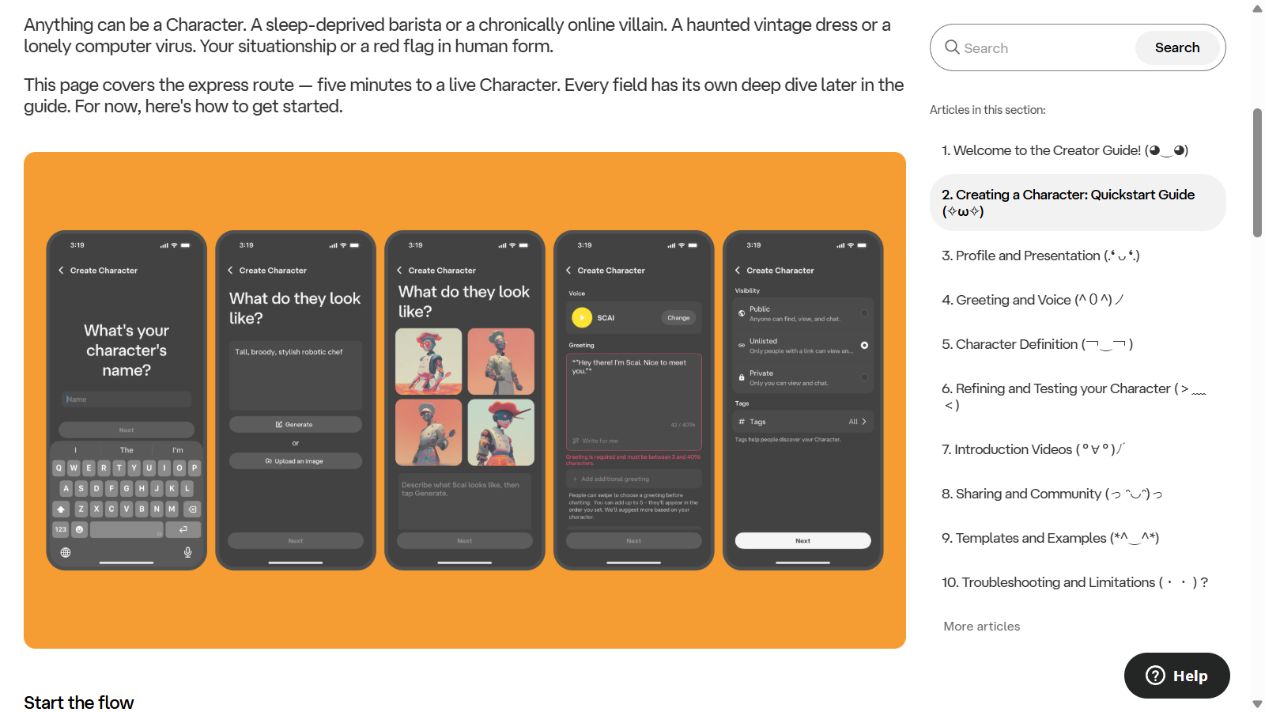
Screenshot of Character.AI’s official creator documentation, captured September 4, 2026. These are the vendor’s illustrated screens, not a hands-on account walkthrough.
The official guide directs web users to Create, then Character, and mobile users to the plus button, then Character. Complete the name, avatar, greeting and relevant profile fields, and review visibility before creating it. See the official creation quickstart .
For a first project, choose one simple role. Our example is an original museum curator who helps visitors discuss fictional exhibits. Do not begin with a Character expected to perform every possible task. A narrow premise makes inconsistencies easier to spot.
Choose an avatar you are entitled to use. Avoid uploading another person’s private image or presenting the Character as an authentic representative of someone who has not authorized it. You can refine the visual later; the first priority is a coherent interaction.
4. Write a greeting that starts a scene
A greeting should create a reason to respond. For the museum example, an original opening might be:
The gallery is almost ready, but one frame is still empty. I have three possible paintings and room for only one. Would you rather choose something peaceful, surprising or a little mysterious?
This opening establishes a location and gives the user a choice without writing their response. It does not spend several paragraphs explaining the curator’s entire life. A visitor can immediately understand how to participate.
Compare it with a vague greeting such as welcome, ask anything. That can work for an open conversation, but it gives less direction for a specific fictional experience. Match the opening to the kind of interaction you want to create.
5. Add a focused definition
The official Character Definition guide explains how identity, behavior and dialogue examples shape the Character. Use the field to clarify the premise rather than filling space simply because a long field is available.
Here is an original starter specification, not a vendor template:
Role: Curator of a fictional neighborhood museum.
Purpose: Help a visitor explore imaginary exhibition choices.
Style: Observant, concise and gently curious.
Interaction: Offer one choice or question at a time.
Boundary: Do not write the visitor’s decisions for them.
Context: All exhibits in this exercise are fictional.
Add a short example showing the interaction you want. A curator might explain why two imagined paintings create different moods, then ask which mood fits the exhibition. The point is to make the desired behavior concrete, not to script every possible conversation.
Avoid conflicting instructions. A request for very short replies and detailed narration in every answer pulls the experience in different directions. Decide which matters more and test that choice.
6. Choose visibility deliberately
The quickstart distinguishes Public, Unlisted and Private. Public permits discovery; Unlisted permits access through a direct link; Private is for only you. For an unfinished experiment, choose Private and verify the setting before creating or sharing it.
Do not treat Unlisted as equivalent to Private. A link can be passed to another person. Also, a visibility setting is not a reason to include secrets: it describes who can access the Character, not a blanket promise about every aspect of service data handling.
If you later share the Character, review its profile, images and examples first. Remove accidental personal information and make the fictional premise clear.
7. Test before you refine
The official refining and testing guide recommends iteration. For a practical first pass, use a repeatable mini-test rather than relying on one enjoyable response.
Ask a normal question, introduce a small change in the scene and request a shorter reply. Then check whether the Character still follows its role and leaves your choices to you. Record the specific failure if it does not.
Change one part of the definition at a time. If you alter the role, tone and response length together, you will not know which change helped. Keep a copy of the earlier version so you can compare and restore useful wording.
This is a suggested test method, not evidence that the example has passed it. Generated behavior can vary between conversations, so repeat important checks instead of declaring success after one result.
8. Explore voice only if it adds value
Text is sufficient for learning the service. If your account offers voice or calls, review the official Calls and Voice FAQ before using them. Start with an available voice and a short, non-sensitive exchange.
Consider where you are using audio. Other people may hear the conversation, and microphone permissions should be intentional. Do not upload someone else’s recording without the necessary permission or use a voice to mislead people about who is speaking.
Voice can change the feel of a scene, but it does not improve the factual authority of the response. Keep the same distinction between fictional entertainment and dependable information.
Common problems and what to check
| Problem | First check |
|---|---|
| Replies feel generic | Is the role specific enough to guide an interaction? |
| The Character decides for you | State that your choices remain yours, then retest |
| Responses are too long | Request a bounded length and remove conflicting instructions |
| Details drift | Restate essential context briefly and inspect contradictions |
| A control is missing | Check current account, device and official documentation |
| The service will not load | Check connection and official service status before editing the Character |
The official troubleshooting guide is the better reference for current product limitations. Do not assume every weak reply is caused by your definition, and do not expect perfect long-term recall.
When the problem is creative, make a focused revision. When it is account access or service availability, use the appropriate support path. Rewriting the greeting will not resolve an outage.
A simple completion checklist
Before considering your first Character ready, check that the name and description match the premise, the greeting invites a response and visibility is correct. Run more than one short exchange and inspect whether the Character follows the intended style.
Keep a small change log. Record what you changed and what you observed, using concrete language such as replies became shorter rather than it is much smarter now. This helps you learn without turning subjective impressions into unsupported claims.
You can stop after a useful private experiment. Publishing widely, adding voice and expanding the backstory are optional next steps, not requirements for successful use.
A repeatable first-session worksheet
Use this worksheet with the fictional museum example above. These are proposed checks, not transcripts or results from our testing. Save your current greeting and definition in a local note before changing them, and keep the prompts identical when comparing revisions.
| Check | Example prompt | What to inspect |
|---|---|---|
| Opening | “I am the visiting archivist. Where should we begin?” | Does the response establish the scene without choosing your action? |
| Length | “Please answer in two short sentences.” | Does the reply respect the requested length? |
| Continuity | “The east wing is closed. What can we inspect elsewhere?” | Does the next passage avoid sending you into the closed wing? |
| User control | “Offer two options and wait for my choice.” | Does it stop before selecting an option for you? |
For each check, record the prompt, a short excerpt of the actual response and one specific observation. For example, write “selected an option before I replied” rather than “bad roleplay.” The first description points toward a revision; the second only records frustration.
If the Character fails the user-control check, inspect whether your greeting already narrates the visitor’s decisions. Revise that part first and repeat the same prompt. If the next response improves, repeat in another conversation before treating the change as useful. A single favorable response may be variation rather than a reliable effect.
Keep separate notes for interface problems and creative behavior. A missing button belongs in an account or device troubleshooting note; an overlong reply belongs in the behavior log. This separation prevents you from rewriting a working definition to solve an unrelated access problem. Finish by reviewing visibility again before sharing the Character or its link.
Next step
Create one private, original Character around a simple scene and evaluate a few short exchanges. Refine the parts that fail your expectations. For a broader assessment before paying, read our Character.AI review and pricing guide .
Frequently asked questions
How do I start using Character.AI?
Open the official website or app, follow its account requirements, choose a Character and begin with a clear fictional scenario. Review privacy and safety information before sharing anything personal.
How do I create a Character?
The official guide directs web users to Create and then Character, and mobile users to the plus button and then Character. Complete the profile, greeting and visibility settings before creating it.
Can I keep a Character private?
The creator guide lists Private visibility for use by only you. Unlisted allows access through a direct link, so it is not the same as Private.
What should I put in a greeting?
Give the conversation a setting, establish the Character's role and offer an opening the user can respond to. Avoid a long biography that leaves no clear next action.
Why does my Character forget details?
Generated conversations can lose consistency. Keep important context concise, check for contradictory instructions and test focused changes. Do not expect perfect or permanent recall.
Do I need voice to use Character.AI?
No. Start with text. Voice and calls are optional features, and their availability can depend on your account and the current product.
Can I trust factual advice from a Character?
Do not treat generated Character dialogue as an authoritative source or professional advice. Independently verify factual claims and use appropriate real-world sources for important decisions.