How to Use Cursor
Learn how to use Cursor for a small, reversible code change, from installation and context to permissions, diff review, tests and recovery.
To use Cursor, install the editor from its official website, sign in, open a small repository, ask it to explain a specific part of the code, and request one bounded change. Inspect the diff and run the project’s relevant checks before committing. Your first success should be a change you can explain and reverse.
Research scope and limitations
- Research type
- Official-source documentation review and editorial analysis
- Sources reviewed
- 3
- Hands-on tested
- No
- Last verified
- November 5, 2026
- Limitations
- No authenticated account or performance benchmark. Examples and fit recommendations are editorial analysis. Paid prices and unlisted account entitlements not verified.
Table of contents
To use Cursor, install the editor from its official website, sign in, open a small repository, ask it to explain a specific part of the code, and request one bounded change. Inspect the diff and run the project’s relevant checks before committing. Your first success should be a change you can explain and reverse.
This tutorial follows current official documentation checked November 5, 2026. The example repository and prompts are proposed exercises, not a claim that we tested an account or measured coding performance. Exact menus, models and access can vary. Use the instructions shown in your installed version when a label differs.
The outcome is deliberately modest: change an empty-state message in an existing application without changing its behavior. That teaches context selection, task boundaries, review and recovery without making an unreviewed agent responsible for an entire product. For product fit before installation, read our Cursor review .
How to use Cursor: define the first task
Choose an application you can already run. A local demo, learning repository or disposable copy is preferable to a production checkout with customer data. Write down the start command and relevant test command from its README. If you cannot start the application manually, fix that first; otherwise an environment problem can look like an agent failure.
For this exercise, imagine a task-list application whose empty state says “Nothing here.” The desired change is “No tasks yet. Add your first task to get started.” The acceptance condition is that the message appears only when the list is empty, existing tasks still render, and no new dependency or network request is introduced.
Keep a short task note outside the conversation. Include the old wording, desired wording, affected screen and prohibited changes. This note gives you a stable reference if the conversation grows or a suggestion drifts into redesign. It also makes the final review about observable behavior rather than whether the response sounds persuasive.
Install, sign in and confirm the project boundary
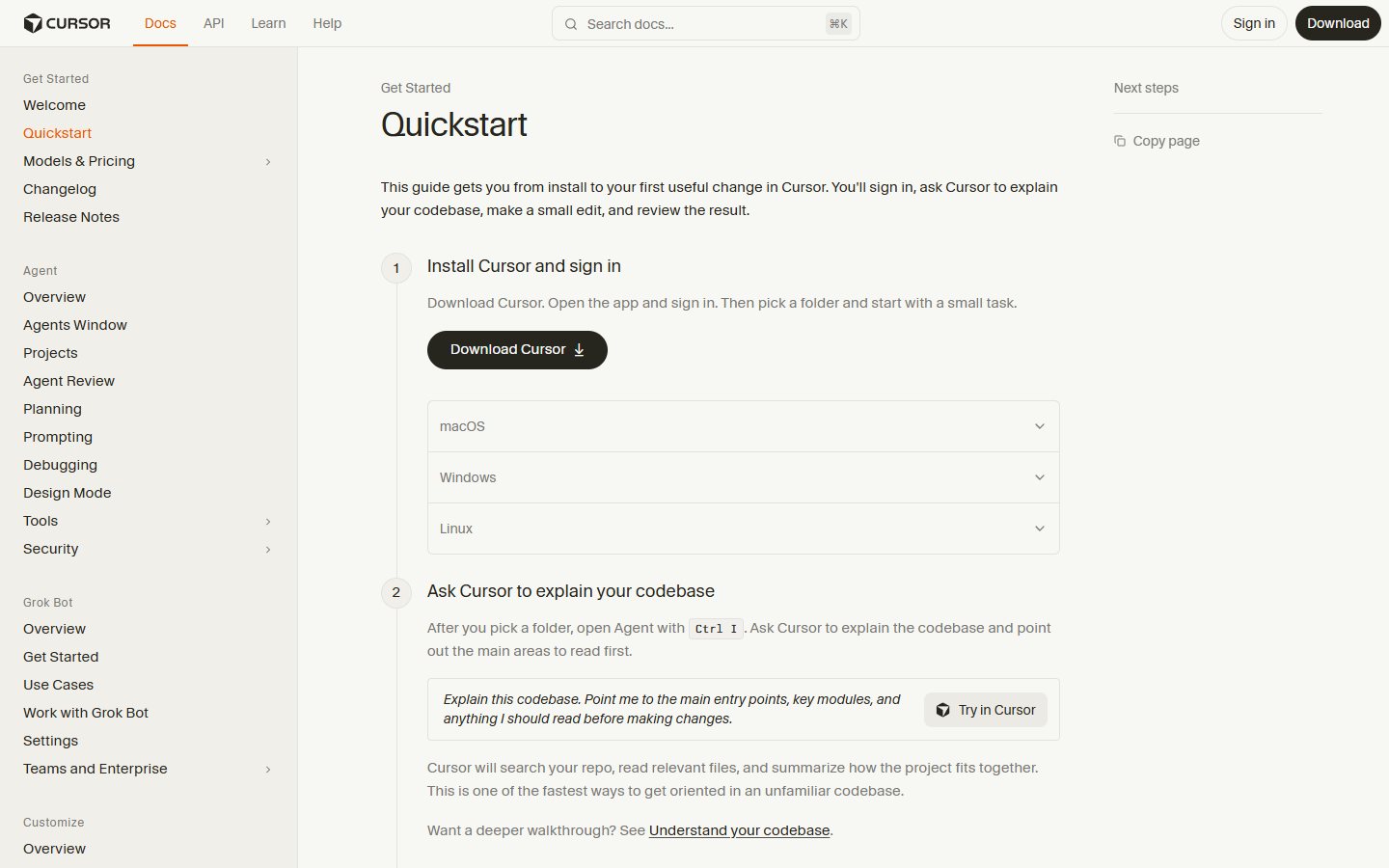
Use the download linked from Cursor’s official quickstart , choosing the build appropriate to your operating system. Follow the installation and sign-in instructions there. Avoid downloading an editor installer from a sponsored search result or a tutorial mirror. This is a practical supply-chain precaution, not a claim about any particular third party.
Open the repository folder that contains the application’s manifest and README. Opening a parent folder containing many unrelated projects increases the chance of supplying irrelevant context. Opening only a source subfolder may hide configuration needed to understand the application. Check the file explorer before asking the agent to work.
Review your organization’s rules for source-code access before using a work repository. A local editor does not establish that every AI operation runs locally. Model access, privacy settings, remote execution and connected services are separate decisions. Do not paste secrets or private customer records into a prompt simply because they exist somewhere in the project.
Establish a clean baseline
Create a branch or disposable working copy using your normal version-control workflow. Check for existing uncommitted changes and record which files belong to another task. Run the application’s usual start command and the smallest meaningful existing test suite. Save the results so you can distinguish a pre-existing failure from a regression caused by this edit.
For a beginner, the important baseline is observable: the app starts, the empty state appears, adding a task replaces it, and the relevant check passes. You do not need an elaborate benchmark. If dependencies cannot install or the app needs unavailable credentials, choose a simpler sample rather than asking the agent to invent working environment values.
Do not let the assistant discard unrelated changes to achieve a clean status. If you are unsure who owns a modified file, pause editing that file and clarify locally. A narrowly scoped task is easier when its starting state is known. Version control is a recovery mechanism, not permission to overwrite other people’s unfinished work.
Ask for an explanation before requesting edits
Cursor’s quickstart describes explaining a codebase, making a small edit and reviewing the result. Begin with a focused question: “Find the component that renders the task-list empty state. Explain the condition that displays it and identify any existing tests. Do not edit files or run commands yet.”
Read the cited files yourself. Confirm that the named component actually contains the visible wording and that the condition matches what you observed. If the answer points to a translation file, generated asset or unused component, ask a follow-up tied to the active rendering path. A correct-looking filename is not sufficient evidence.
This explanation step creates a useful stop point. You can assess whether the assistant understands the application before it changes anything. It also prevents a common beginner mistake: supplying a vague goal such as “improve onboarding” and receiving a much wider patch than the team can comfortably review.
Supply only the context the change needs
Include the task component, its test and any localization file that owns the text. Explain which language variant or screen is in scope. If the repository contains several frontends, identify the target application explicitly. Ask the agent to state any missing context before implementing a solution based on assumptions.
Avoid sending the whole business problem when a precise code question will do. For example, the assistant needs to know that the empty-state message changes; it does not need a private customer interview transcript. Reduce sensitive details to a synthetic requirement. Keep copied error messages free of tokens, connection strings and customer identifiers.
For repeatable project guidance, Cursor rules support instructions associated with a codebase. A useful rule states which package manager the repository uses and which checks apply. Do not encode guesses as permanent rules. Instructions help communicate conventions; they do not replace review or restrict every possible action by themselves.
Request a bounded edit
Use a prompt such as: “Change only the task-list empty-state wording to the approved sentence. Preserve the existing condition and styling. Update the existing focused test if it asserts the old text. Do not add dependencies, change authentication, alter routing or refactor adjacent components. Explain the proposed files before editing.”
The constraints are meaningful because they connect directly to the outcome. A text change rarely needs a new package or an application-wide refactor. If the assistant proposes one, ask why the existing mechanism cannot express the requirement. Accept a wider change only after understanding its necessity and updating the task’s acceptance conditions.
Treat the proposal as an editable plan. If there is no existing test, decide whether a new focused test meaningfully verifies the behavior. Do not demand tests that merely repeat a string constant. Checking that the correct state renders and the nonempty state remains intact provides more useful evidence than asserting an implementation detail.
Review command permissions before execution
Cursor’s run-mode documentation explains controls for agent tool execution and approval interruptions. Inspect the controls available in your version. For the first exercise, keep enough interaction to understand what commands will run, which directory they target and whether they can contact external services.
Read a command before approving it. Starting the existing local test suite differs from applying a database migration, deleting files or deploying an application. If the requested command exceeds the task, reject it and ask for a narrower alternative. A tool’s ability to execute an action does not make that action necessary.
Record commands and outcomes in the task note. If a test cannot run because a dependency is unavailable, retain that limitation. Do not translate “the assistant believes it should pass” into a passing result. A useful completion report separates checks that ran, checks that failed and checks that still need a suitable environment.
Inspect the diff as the primary review surface
Review every changed file. For the example, you should expect the component’s text or localization entry and perhaps a focused test. Unexpected lockfile changes, configuration edits or deleted tests require explanation. Ask the assistant to remove unrelated edits while preserving the intended change, then inspect the revised diff again.
Read the surrounding code, not only highlighted lines. Check that the text remains in the correct conditional branch and that translation keys still match. A one-line patch can still affect accessibility, pluralization or localization. If the application uses a reusable empty-state component, make sure the change does not unintentionally alter every screen using it.
| Review question | Evidence to inspect | Stop condition |
|---|---|---|
| Is the scope correct? | Changed files and diff | Unrelated behavior changed |
| Does the app still work? | Empty and nonempty states | Existing task list fails |
| Is validation meaningful? | Relevant test output | Tests removed to pass |
| Can the change be recovered? | Branch and baseline | Unowned work overwritten |
Verify behavior and save the result
Run the relevant check and inspect the application in both states. Compare the visible wording against the approved sentence. Add a task, then remove it if the sample permits, confirming the state transition still works. If a visual check cannot be performed, state that explicitly rather than treating a compilation result as equivalent evidence.
Ask Cursor to summarize the changed files, checks and unresolved limitations. Compare that summary with the terminal output and diff. Correct any discrepancy before committing. A clean assistant response is useful documentation, but the repository state and observed behavior determine whether the task is complete.
Commit through your normal workflow once the result meets the acceptance conditions. Keep the commit focused so a reviewer can understand and revert it independently. A good first Cursor session ends with a small accepted patch and a clear explanation of why it works. It does not need to demonstrate every feature in one sitting.
Common problems, strengths and limitations
If the agent edits the wrong component, revisit the active rendering path and supply narrower context. If it repeatedly changes unrelated files, shorten the task and require a file-level plan. If commands fail before reaching the test, diagnose the environment rather than asking the model to repeatedly regenerate code. Each problem calls for a different correction.
The main potential strength is keeping explanation, editing and review close to the repository. The tradeoff is that a plausible change still requires developer judgment. These are editorial assessments, not measured productivity results. Compare the workflow with our Cursor features guide and Cursor pros and cons .
For buying decisions, inspect Cursor pricing separately. This tutorial establishes no particular model allowance, paid entitlement or guaranteed cost. Broader evaluation belongs in the AI Tools guide and AI Tools category . Start with a reversible task, then expand only when the review process works.
Frequently asked questions
Do I need an existing application to learn Cursor?
No, but a small application that already runs makes the first exercise easier to assess. You can separate understanding the editor from inventing architecture and configuring infrastructure. Use a public sample or disposable project when your work repository contains sensitive information or depends on services you cannot access safely.
Should I allow automatic command execution immediately?
For a first session, inspect the available run controls and retain enough review to understand actions before they execute. Begin with local, bounded commands. Increase autonomy only when the repository, task and recovery process are clear. The appropriate setting depends on your environment and organization, not a universal beginner shortcut.
Are Cursor rules a substitute for reviewing code?
No. Rules communicate recurring instructions, such as conventions or expected checks. They do not prove that a patch is correct, that every instruction was followed or that an action is safe. Review the actual diff and observed behavior. Keep rules short enough that their requirements remain understandable and relevant.
What if the generated patch passes tests but looks wrong?
Do not accept it solely because tests pass. Compare it with the requirement, inspect whether the tests exercise the intended behavior and run an appropriate manual check. Tests can omit important cases. Ask for an explanation or narrower revision, and retain a record of any validation that remains unavailable.
How do I know I am ready for a larger task?
You should be able to identify the affected files, define acceptance conditions, understand proposed commands, review the resulting diff and recover from an unwanted change. Increase scope one dimension at a time. A multi-file change with clear tests is a better next step than an open-ended request to rebuild the whole application.