Krea vs ChatGPT: Which Is Better?
Compare Krea and ChatGPT for AI images, video, editing, creative control, research, writing, team workflows, pricing, and commercial use.
Direct answer
Krea is better for a creator or team whose main requirement is a dedicated visual production environment spanning AI images, video, editing, enhancement, real-time exploration, multiple models, and creative workflows. ChatGPT is better when visual generation is one part of a broader conversational workspace for research, writing, analysis, planning, files, coding, and iterative problem-solving.
Choose Krea when you want to explore and produce visual assets through specialist tools. Choose ChatGPT when you want to discuss a problem, develop the brief, create or edit an image, and continue into copy, research, analysis, or another deliverable without changing the core interaction model.
Neither product has a permanent claim to “better image quality.” Results depend on the active model, prompt, references, settings, aspect ratio, typography, style, safety rules, and the number of iterations. A useful comparison tests the same real business briefs and scores accepted outputs, not attractive examples selected after the fact.
This article combines a live SERP review with official sources checked on September 3, 2026. We did not conduct a controlled generation benchmark, so we distinguish documented capabilities from judgments that require a buyer pilot.
Krea vs ChatGPT at a glance
| Requirement | Better starting point | Why |
|---|---|---|
| Dedicated AI visual workspace | Krea | The product is organized around image, video, editing, enhancement, assets, models, and creative tools. |
| Conversational image ideation | ChatGPT | A brief can develop through dialogue before and after an image is generated. |
| Multiple creative models | Krea | Its model catalog and workflow expose a range of image and video options. |
| Video generation workflow | Krea | Video is a visible first-class part of the creative suite. |
| Writing, research, and analysis | ChatGPT | These are core uses beyond image creation. |
| File and document work | ChatGPT | The broader product supports uploads and plan-dependent work across documents and data. |
| Enhancement and upscaling | Krea | Dedicated enhancement and upscaling tools are part of the visual workflow. |
| One assistant for mixed knowledge work | ChatGPT | It covers more non-visual tasks in one conversational environment. |
| Visual experimentation and art direction | Krea | Real-time, canvas, editing, model, and reference-oriented workflows support exploration. |
| Simplest occasional image request | ChatGPT | Existing users can create an image inside a familiar chat without adopting a separate creative suite. |
The products solve different primary jobs
Krea is a creative suite. Its live homepage presents image and video creation, editing, enhancement, upscaling, real-time generation, assets, LoRA training, a node editor, and access to different model-led workflows. The interface resembles a creative workspace with specialist entry points.
ChatGPT is a general-purpose assistant and work environment. Its official overview presents chat, work, coding, writing, images, connected applications, voice, research, and other tasks. Image generation is important, but it exists inside a much broader product.
That difference should shape the evaluation. Comparing only one generated image ignores Krea’s production tooling and most of ChatGPT’s value. Comparing total feature counts is equally misleading because a copywriter, illustrator, video producer, analyst, and operations manager assign different value to the same capability.
Krea overview
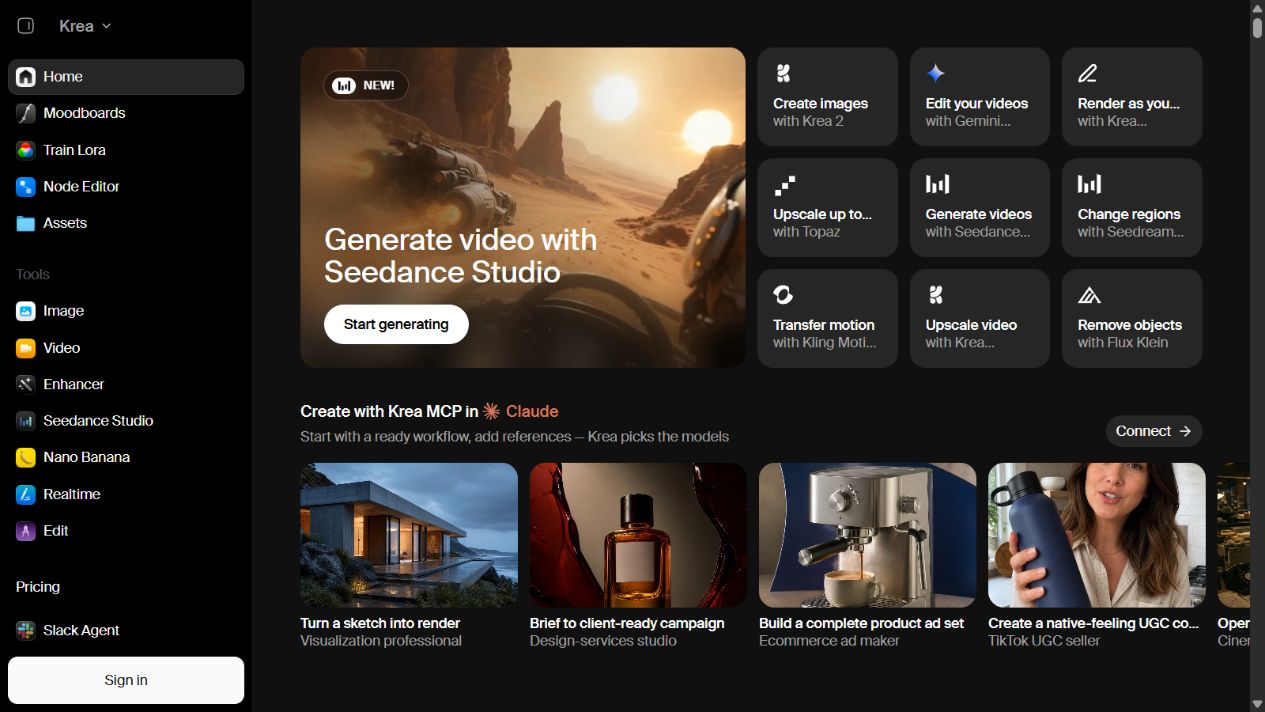
Krea homepage captured September 3, 2026. The visible product experience is centered on specialist visual workflows; model and plan availability can change.
Krea is designed for visual work. A user can begin from image generation, video generation, editing, enhancement, real-time creation, assets, training, models, or more structured workflows. This is useful when making the asset is not a one-prompt event but a sequence of exploration, selection, revision, enhancement, and export.
Krea strengths
Specialized visual workflow. The product makes creative modes visible instead of hiding them behind one chat box. That can reduce friction for people who think through references, canvases, regions, frames, models, motion, and variations.
Image and video breadth. Official Krea pages present both image and video generation. A team exploring campaigns, concepts, motion studies, social assets, product visuals, or storyboards can evaluate more of the pipeline in one creative environment.
Model choice and experimentation. Krea publishes a model catalog and gives users ways to work across model-led experiences. Choice can help when no single model consistently satisfies typography, realism, style, motion, speed, or controllability requirements.
Editing and enhancement. Editing, changing regions, removing objects, upscaling, and enhancement are visible product jobs. These capabilities matter after generation, when a promising concept needs correction or preparation for delivery.
Creative assets and repeatability. Asset organization, reference-based workflows, training options, and APIs may help repeatable production. Exact functionality and plan access must be validated for the intended workflow.
Krea limitations to test
More tools and models create more decisions. Teams need documented defaults for approved models, reference handling, aspect ratios, export settings, brand review, rights, safety, storage, and final asset ownership. Without a production standard, visual variety can become inconsistency.
Compute economics can be difficult to predict from a feature list. Test actual briefs and record attempts, rejected outputs, video seconds, enhancement passes, upscales, queue time, concurrency, and credits or compute consumed. A cheap-looking plan may become expensive if accepted outputs require repeated model switching and rework.
Krea should not be assumed to replace a general research, writing, coding, or analysis assistant. A creative team may still need another tool for campaign research, long-form copy, spreadsheet analysis, policy work, development, or broad organizational knowledge tasks.
Sources: Krea , Krea models , Krea solutions , Krea API , and Krea pricing .
ChatGPT overview
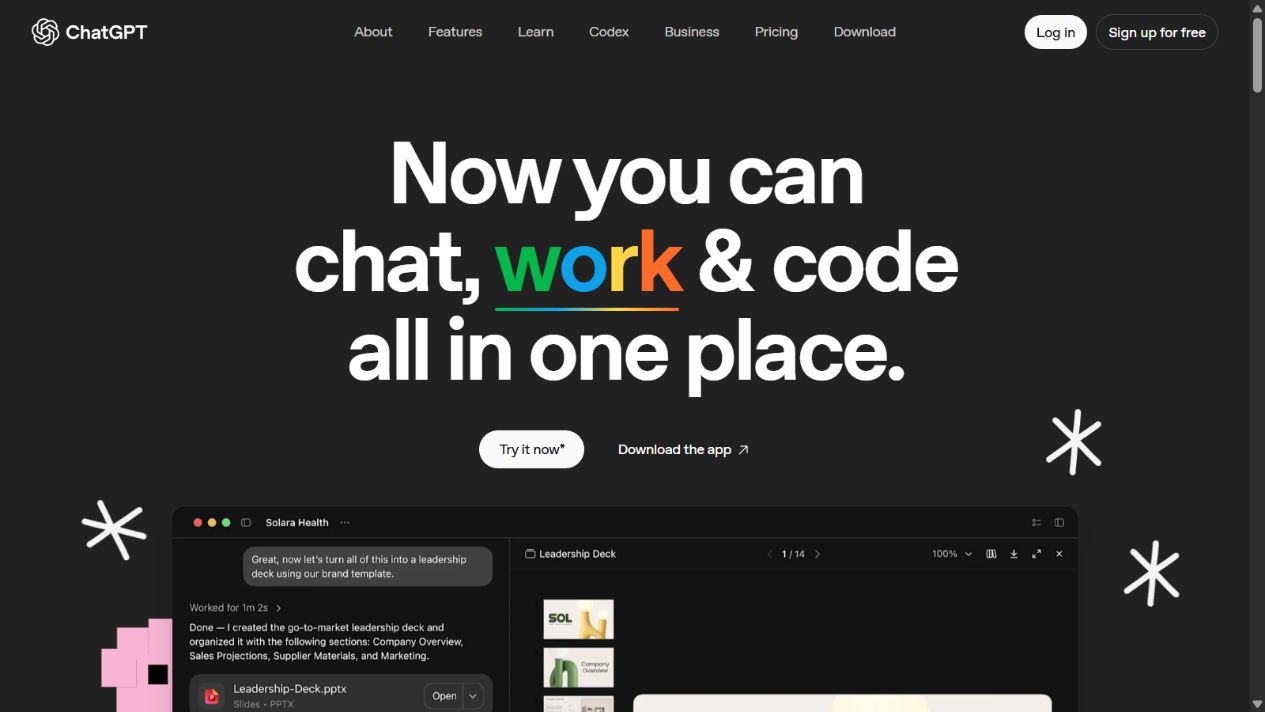
ChatGPT overview homepage captured September 3, 2026. Image generation sits inside a broader assistant; exact models, limits, and plan features can change.
ChatGPT begins with conversation. A user can explain an objective, attach context, ask questions, develop a brief, generate an image, critique it, request changes, and continue into copy or another deliverable. That continuity is its main advantage in this comparison.
ChatGPT strengths
Brief development through dialogue. A user does not need a finished prompt at the start. ChatGPT can help identify audience, purpose, hierarchy, composition, constraints, required text, aspect ratio, and success criteria before generation.
Broader knowledge work. Official product material covers writing, images, work, coding, voice, search, research, file uploads, projects, and plan-dependent applications. One subscription can therefore support many tasks that sit before and after visual creation.
Contextual iteration. Feedback can refer to the conversation and attached materials. This is useful for converting a business request into a production brief, comparing variants, writing alternative headlines, or documenting why an asset was selected.
Simple access for occasional creators. A person already using ChatGPT can request an image without learning a specialist creative environment. For internal illustrations, drafts, presentation concepts, simple campaign ideas, or one-off assets, that convenience may outweigh deeper controls.
Mixed deliverables. A workflow can move from research to copy, tables, code, documents, or images. This is valuable when the final outcome is a campaign plan, landing page, report, presentation, or prototype rather than an image alone.
ChatGPT limitations to test
A conversational interface may provide less direct visual control than a specialist canvas or node-based workflow. Test region-level changes, composition preservation, reference fidelity, repeatability, batch needs, model selection, upscaling, asset management, video requirements, and export specifications.
Image access and speed vary by plan and active product terms. The official pricing page distinguishes limited, expanded, or higher image availability across plans and states that limits apply. Do not convert marketing language such as “unlimited” into a capacity promise without reading applicable guardrails and current terms.
The product’s breadth can also complicate governance. Organizations must decide which plans are approved, how data controls differ between individual and business offerings, whether content may be used for model improvement, how applications and connected sources are governed, and what sensitive material is prohibited.
Sources: ChatGPT overview , ChatGPT Images , ChatGPT pricing , and OpenAI usage policies .
Image generation and creative control
For a specialist creator, control often matters more than the first output. Evaluate how each product handles references, sketches, composition, typography, exact text, style consistency, color, object placement, local edits, background removal, resizing, upscaling, export, and version history.
Krea deserves the first pilot when users want multiple models and visible creative tools. The interface exposes distinct modes and a model ecosystem. This can help an experienced creator choose the right path for a job and intervene during production.
ChatGPT deserves the first pilot when users want the system to help interpret an ambiguous brief. Its conversational model can turn business context into image instructions and keep revisions connected to the original goal. The tradeoff is that a creator may have fewer explicit production controls for some workflows.
Do not score beauty alone. Use acceptance criteria such as accurate required text, correct objects, brand colors, layout space, reference fidelity, prohibited elements, edit precision, resolution, export format, and time to approval. Record the complete attempt history, not only the selected image.
Video, real-time creation, and enhancement
Krea is the clearer choice in this comparison for a buyer who explicitly needs an integrated image-and-video creative suite. Its homepage visibly separates video generation, video editing, motion transfer, upscaling, and other moving-image workflows. Validate the exact models, duration, resolution, audio, reference controls, queue, speed, watermark, export, and compute rules.
Krea also presents real-time and enhancement capabilities as dedicated tools. These can matter for rapid art direction, live exploration, low-resolution source improvement, or preparing generated work for production. Quality remains content-dependent; an upscale cannot recover every missing detail correctly.
ChatGPT’s main comparison advantage is not specialist video production. It can still contribute to scripts, shot lists, storyboards, prompts, creative direction, review, captions, and campaign planning. If final video generation is mandatory, confirm the current OpenAI product and regional availability rather than assuming every ChatGPT plan includes the same workflow.
Research, writing, analysis, and coding
ChatGPT wins decisively when the work extends beyond visual production. A marketing team may research an audience, summarize documents, analyze a spreadsheet, plan a campaign, draft copy, generate an image, write alt text, create a landing-page prototype, and prepare stakeholder notes in one environment.
Krea can participate in that workflow but is not positioned as the same breadth of general assistant. Its strongest value is the creative production stage. Using both can be rational: ChatGPT develops the evidence-backed brief and supporting deliverables; Krea explores and produces specialized visuals.
Avoid sending information between products casually. Define which source material may be uploaded, whether customer or employee data is allowed, how references are licensed, where generated assets are stored, and which system holds the approved final. Tool convenience does not override privacy, confidentiality, or intellectual-property obligations.
Pricing and total cost
A direct monthly-price comparison is incomplete because the products package different work. Krea value is tied to creative models, compute, image and video volume, enhancement, speed, concurrency, APIs, and production controls. ChatGPT value may be distributed across writing, research, analysis, coding, files, images, and other assistant tasks.
Build two cost models. First calculate the cost of the narrow visual workflow: expected jobs, variants, video seconds, enhancement passes, upscales, compute, rework, accepted outputs, storage, and human review. Then calculate the broader stack: other tools each product replaces or still requires, team administration, training, integrations, and duplicated subscriptions.
Use current official pricing pages during procurement. Record the date, currency, taxes, billing period, plan, usage limits, model access, commercial rights, cancellation, renewal, support, and overage behaviour. Product names and limits can change faster than an annual buying guide.
Team governance and commercial use
Before production use, review terms, privacy, data processing, model training choices, retention, subprocessors, content credentials or provenance, output ownership, commercial-use language, acceptable use, copyright, publicity rights, and restricted content. Legal review should address the intended assets and jurisdiction, not AI tools in the abstract.
Create an approved workflow that covers:
- permissible source and reference material;
- prohibited confidential, personal, regulated, or licensed inputs;
- approved accounts, plans, models, and integrations;
- brand, factual, legal, bias, and accessibility review;
- human approval before public or customer-facing use;
- prompt, source, model, date, editor, and decision records where needed;
- storage, naming, versioning, retention, and deletion;
- incident handling and takedown.
Generated output can contain incorrect text, implausible details, visual stereotypes, unwanted resemblance, trademark-like elements, or misleading scenes. A polished image is not proof of factual or legal suitability.
How to run a fair Krea vs ChatGPT test
Use at least six representative briefs: a brand-safe campaign visual, a product concept, an image with exact text, a reference-guided scene, a local edit, and a short motion or video requirement if relevant. Include difficult cases instead of only the easiest aesthetic prompt.
Give both products the same source package and acceptance criteria. Allow a realistic workflow for each rather than forcing Krea into pure chat or ChatGPT into a node editor. Cap time and attempts. Record setup, prompts, references, model or mode, settings, failures, compute, elapsed time, manual edits, and reviewer decisions.
Score prompt adherence, composition, text accuracy, reference fidelity, edit precision, visual quality, consistency, control, speed, accessibility, governance, rights confidence, cost per accepted asset, and ease of handoff. Weight the score before testing so reviewers cannot change priorities after seeing a preferred output.
Run a blind output review where practical, followed by a workflow review. Blind review reduces brand preference in visual scoring; workflow review captures the real cost of getting there. Keep both because the most attractive output may have required unacceptable effort or risk.
Which should you choose?
Choose Krea if
- image and video creation are the primary jobs;
- creators need a dedicated visual workspace;
- model choice, real-time exploration, editing, enhancement, or upscaling matter;
- the team can define production standards and compute budgets;
- broad writing, research, and coding are handled elsewhere.
Choose ChatGPT if
- visual work begins with conversation, research, or an ambiguous brief;
- images are one part of mixed knowledge work;
- writing, analysis, files, coding, planning, and research have substantial value;
- occasional creators prefer a familiar chat workflow;
- specialist canvas, video, model, or enhancement controls are not the main requirement.
Use both if
- ChatGPT can improve briefs, messaging, research, and review;
- Krea can improve specialist visual exploration and production;
- approved data can move between them safely;
- roles, final asset ownership, review, and total cost remain clear.
Final verdict
Krea wins for dedicated AI visual production. ChatGPT wins for broad conversational work that includes images. Krea should be evaluated first by designers, creative technologists, video creators, and teams that value model choice and specialist visual tools. ChatGPT should be evaluated first by marketers, analysts, founders, writers, educators, developers, and general business users who need to move between thinking and making.
The best decision is workflow-specific. Test identical briefs, disclose the full path to an accepted result, evaluate governance and rights, and calculate cost per approved deliverable. If both products solve different stages well, a governed combination may be stronger than forcing one to replace the other.
Frequently asked questions
Is Krea better than ChatGPT?
Krea is better for specialist visual workflows. ChatGPT is better for broad conversational work across research, writing, analysis, files, coding, and images. The winner depends on which output and operating process matter most.
Which is better for AI image generation?
Krea provides a more specialized visual environment, while ChatGPT provides contextual conversational iteration. Do not assume universal output superiority; test your own briefs, models, controls, and acceptance criteria.
Can Krea generate video?
Yes. Krea officially presents video generation and related editing, motion, and enhancement workflows. Verify current model, plan, resolution, duration, compute, and export details before buying.
Can ChatGPT replace Krea for a creative team?
It may cover simple or occasional image needs, but it should not be presumed to replace Krea’s specialist model, canvas, video, editing, enhancement, asset, or real-time workflows. Pilot the team’s actual production process.
Should teams use both tools?
They can complement each other. ChatGPT can support research, brief development, copy, planning, and critique; Krea can support focused visual production. Govern inputs, rights, review, handoffs, and storage.
Which tool is cheaper?
Compare cost per accepted deliverable and total stack value rather than list price alone. Include compute, variants, video, enhancement, speed, rework, team plans, other workloads, administration, and tools displaced.
Sources
Frequently asked questions
Is Krea better than ChatGPT?
Krea is better when the primary job is visual creation across image, video, editing, enhancement, real-time exploration, and multiple models. ChatGPT is better when image creation is one part of a broader conversational workflow involving research, writing, analysis, files, coding, and planning.
Which is better for AI image generation, Krea or ChatGPT?
Krea offers the more specialized visual workspace and model-oriented workflow. ChatGPT offers a simpler conversational process for describing, generating, and refining images in context. Output quality varies by brief, model, settings, and iteration, so buyers should test their own acceptance criteria.
Can Krea generate video?
Yes. Krea's official product experience includes video generation and related video workflows. Available models, resolution, duration, speed, compute usage, and plan access should be checked against the current product and pricing pages.
Can ChatGPT replace Krea for a creative team?
Not automatically. ChatGPT can support briefs, concepts, image generation, edits, copy, research, and planning, but teams needing model choice, visual canvas workflows, video generation, enhancement, or specialized production controls should evaluate Krea directly.
Should a team use Krea and ChatGPT together?
Often that is sensible. ChatGPT can help develop the brief, messaging, research, variants, and review checklist, while Krea handles specialized visual exploration and production. Define approved inputs, rights, review, storage, and final asset ownership.
Which tool is cheaper, Krea or ChatGPT?
There is no reliable universal answer because the products package different capabilities and limits. Compare the exact plans, expected image and video volume, compute usage, model access, speed, team controls, other ChatGPT workloads, rework, and additional tools displaced.